

Reviews
Phare Review - The European Alternative for Uptime Monitoring and Status Pages
We've tested Phare, a Better Stack alternative for uptime monitoring, incident management and status pages, built and hosted entirely in the EU.
We've tested Asin, an Amazon price tracker that checks products on 11 Amazon stores, keeps every price it reads, and emails you on drops, target prices and restocks, with a REST API and an MCP server on top.
Welcome to this Asin review ✨
Amazon prices move all the time, and the product page never tells you. A pair of headphones can sit at one price on Monday, drop on Wednesday and climb back on Friday, and the "deal" badge you see on Saturday says nothing about whether it's actually a good moment to buy. If you sell on Amazon, it's worse: a competitor can undercut you or lose the Buy Box overnight, and you only find out when your sales dip.
Asin is a small tool built for that. You give it an Amazon link or an ASIN (the 10-character code Amazon uses to identify a product), it checks the price on a schedule, keeps every reading, and sends you an email when the price drops, reaches a number you chose, or when the product comes back in stock. It covers 11 Amazon stores, and the same watchlist is reachable from the web app, a REST API and an MCP server, so you can ask Claude or ChatGPT about your prices.
The website pitches it to three audiences: shoppers, sellers watching competitors, and brands watching their listings. To see how it holds up, I created an account, tracked a handful of real products across five Amazon stores, set alerts, pulled the full list of offers on a product, and called the MCP server directly. The founder also asked me to make sure I tried the Chrome extension, which puts a widget on Amazon product pages, so I installed it and used it on the US and French stores. Here's what I found.
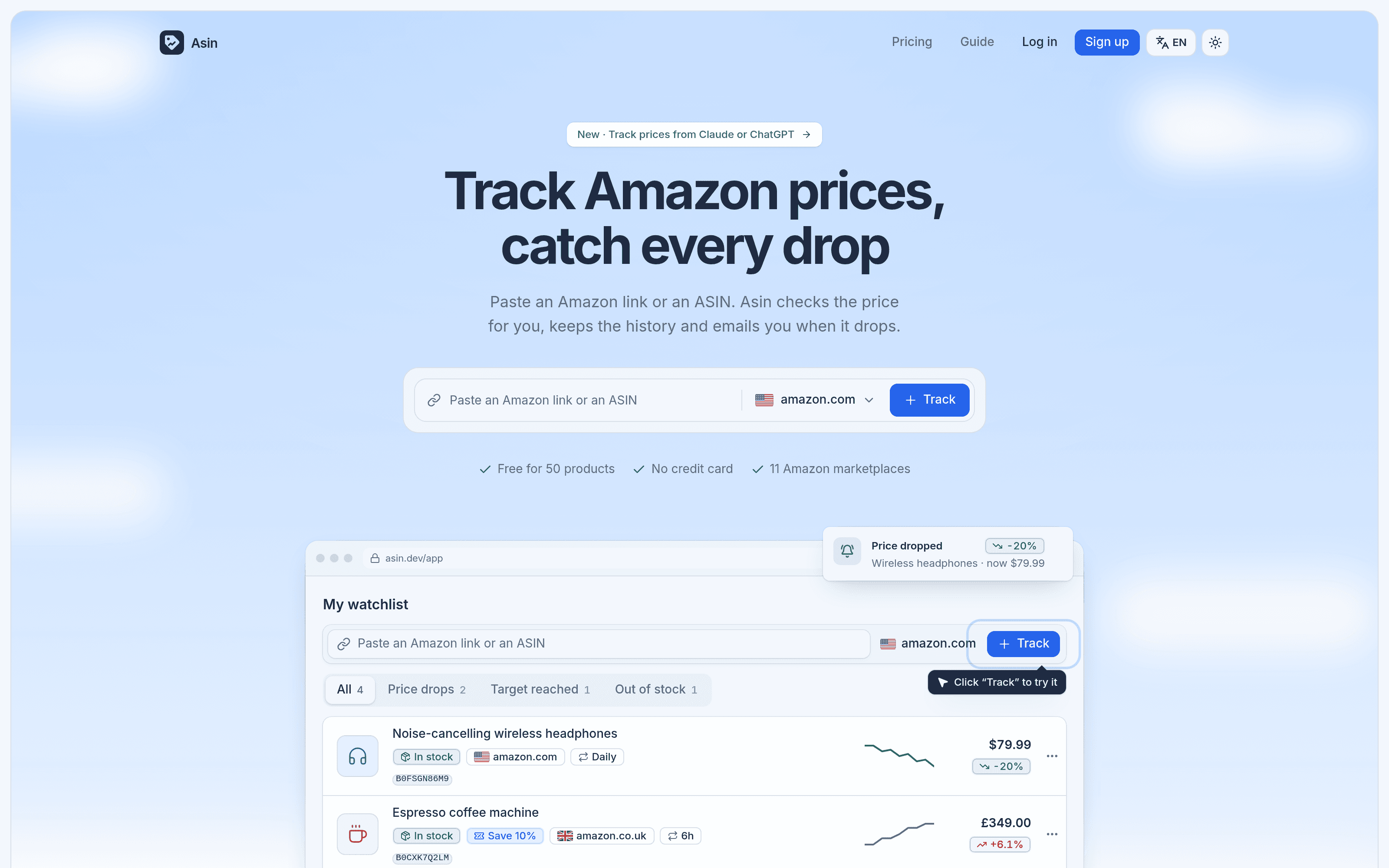
Signing up asks for a name, an email and a password, and that's it. Two details on the form are worth knowing. First, Asin computes a fingerprint of your browser at signup so free credits are granted once per device: a second account on the same computer won't get them again. Second, nothing really happens until you confirm your email. Until you click the link, the account shows 0 credits under a "Confirm your email to get 1,500 credits for free" banner, and the guide warns that unconfirmed accounts are deleted after 24 hours. Once I confirmed, the counter jumped to 1,500 with a "Free credits refill on Dec 7, 2026" line underneath.
The whole model rests on credits, so it helps to understand them right away. One credit is one price check of one product. A product checked once a day costs about 30 credits a month, which is how the free plan's 1,500 monthly credits translate into 50 products. The watchlist header does the maths for you: with my seven products, it read "7 products · about 210 credits a month".
The app itself is a single page with five tabs: Watchlist, Credits, Extension & API, Invoices and Profile. It opens in a dark theme (there's a toggle), and a language menu offers English, French, Spanish, German, Italian, Portuguese, Dutch and Polish.
The bar at the top of the watchlist has three modes, and I tried all of them.
Link or ASIN is the obvious one. I pasted the link of Sony's WH-1000XM5 headphones from Amazon US, hit Enter, and a row appeared with a blue "Checking the price…" badge. One credit left my balance immediately, as the pricing page says: the first check is charged when you add a product. The check itself was fast, done within the same minute, and I saw the price.
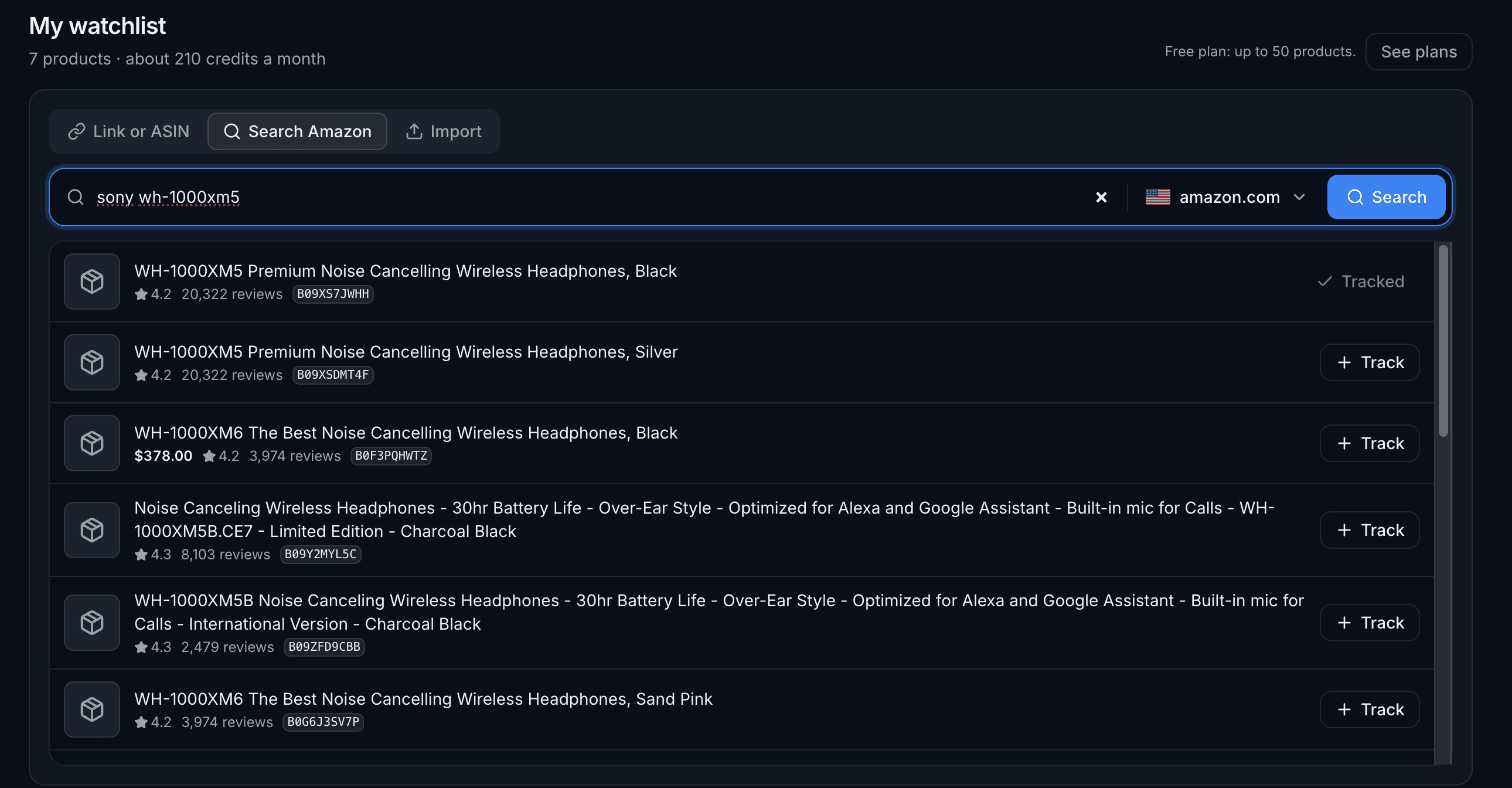
Search Amazon lets you find a product without leaving Asin, and it's free: it doesn't touch your credits. It even worked before I had confirmed my email. Typing "sony wh-1000xm5" returned 16 results, each with its title, star rating, number of reviews, ASIN and a Track button, and once I was tracking the headphones, a second search marked them "Tracked". Results took between a few seconds and a dozen, under a note warning that a search can take up to 30. The results are bare, though. There were no product images, only a generic box icon, and only one of the 16 results showed a price ($378.00 for the newer XM6). It's enough to pick the right ASIN, not to compare products.
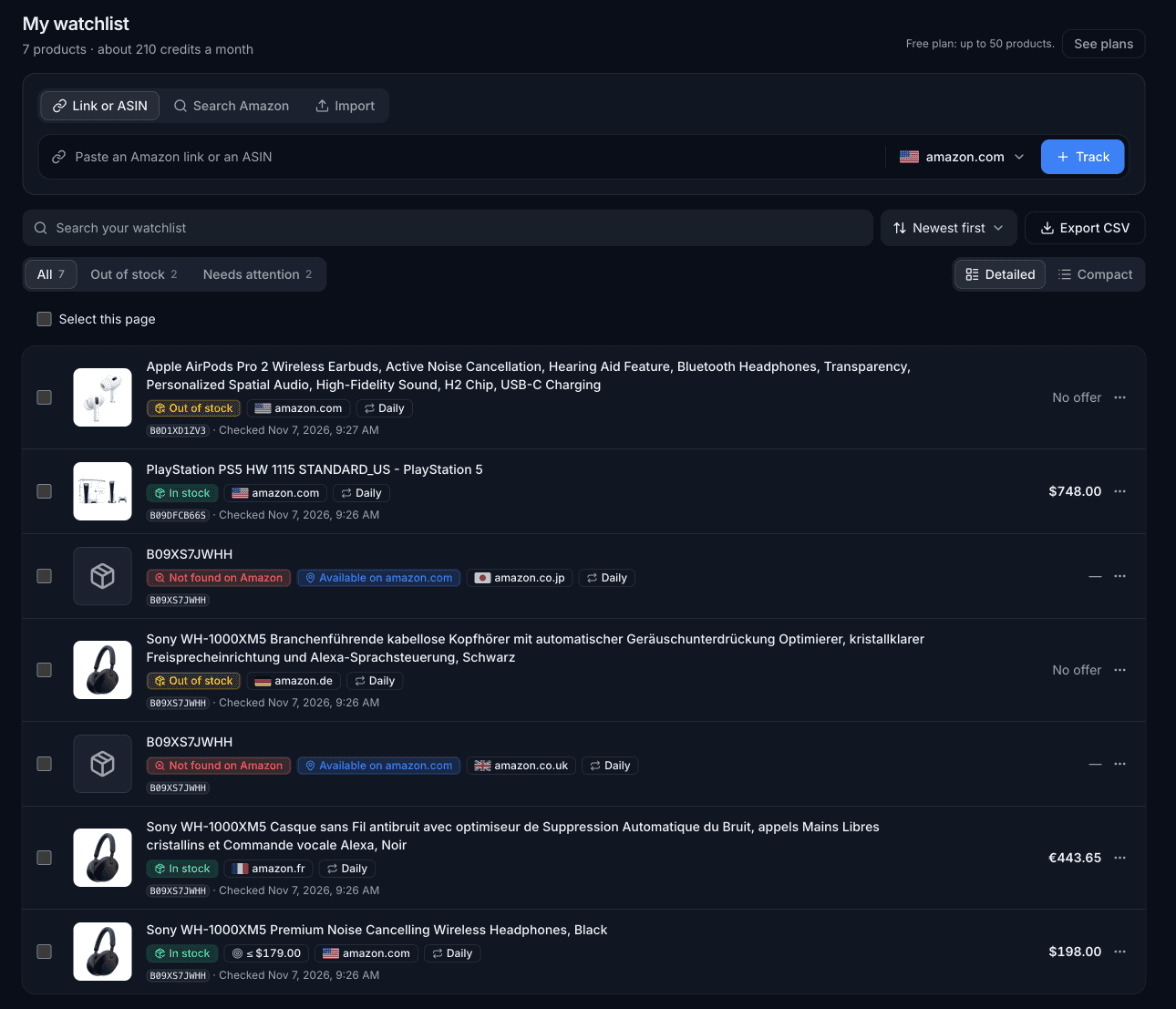
Import is where Asin starts to feel like a tool for people with more than a few products. You paste a list of links or ASINs, one per line, or upload a CSV. The placeholder taught me a handy shortcut: you can add a store after an ASIN with a comma, like B09XS7JWHH,de. I pasted six lines mixing full links from Amazon France and the UK, the same ASIN for Germany and Japan, and two plain ASINs for the US. A counter read "Products found: 6" before I even clicked, and the import confirmed "Added: 6 · Already tracked: 0 · Not added: 0".
That import was really a test of the multi-store promise, and it gave me the most interesting results of the session.
The same Sony ASIN came back with four different answers. On Amazon US it was in stock at $198.00. On Amazon France it was in stock too, at €443.65, with the title in French. On Amazon Germany it was listed, with a German title, but out of stock with "No offer". On the UK and Japanese stores, it didn't exist at all. Prices stay in the local currency, and titles come back in the store's language, so the watchlist is honest about what each store actually shows.
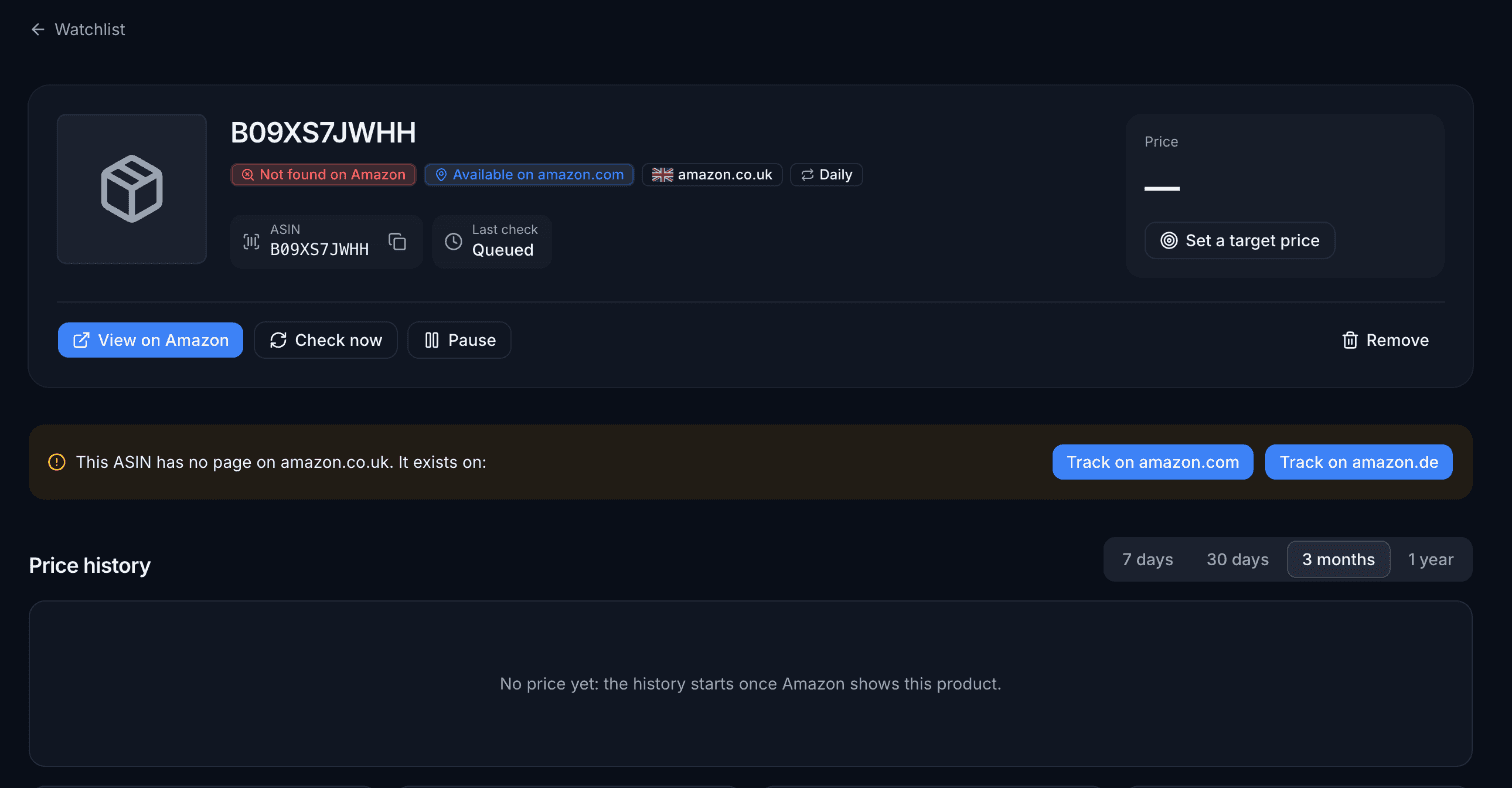
The way Asin handles a wrong store is the part I liked most. The UK and Japan rows got a red "Not found on Amazon" badge next to a blue "Available on" badge pointing at the US store. Opening one of them showed a clear banner saying the ASIN has no page on the UK store and listing where it does exist, with two buttons to track it on the US or German store instead. And both failed checks were refunded. After adding seven products and pulling one list of offers, my balance stood at 1,494 credits: the five checks that returned something, plus the offers, and nothing for the two that hit a missing page.
Once everything had loaded, the watchlist grew filters on its own: "All 7", "Out of stock 2" and "Needs attention 2". Each row shows the product image, its status, the store with its flag, the check frequency and the last check time, with the price on the right. There's a search box for the list, a sort menu, a Detailed or Compact view, and an Export CSV button.
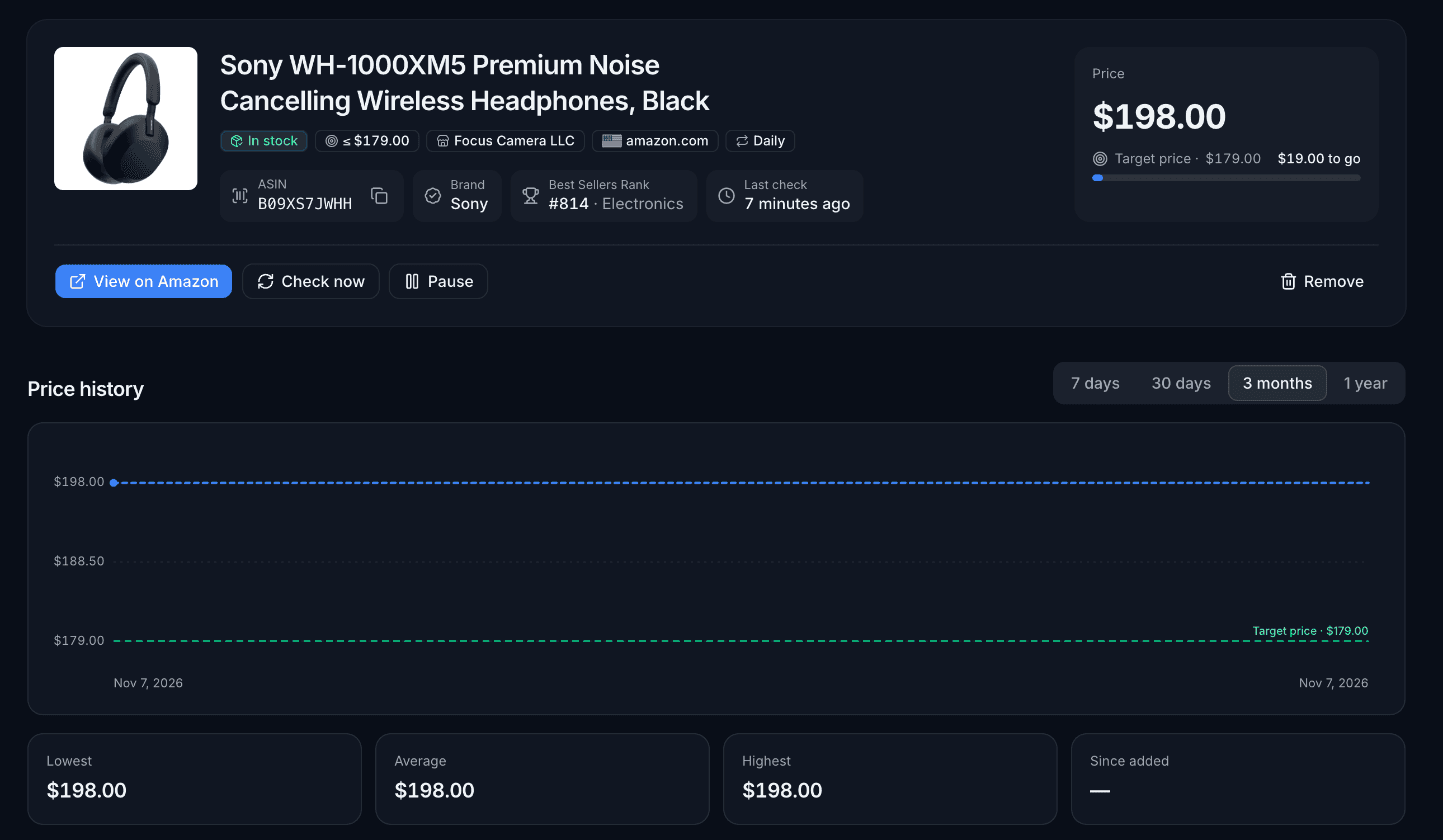
Clicking a row opens the product page, and this is where Asin packs the most information. For the Sony headphones on Amazon US, the header showed the status ("In stock"), the seller (Focus Camera LLC), the store, the frequency, the brand, the Best Sellers Rank (#814 in Electronics) and the time of the last check. Below it sit four buttons: View on Amazon, Check now, Pause and Remove.
Then comes the price history chart, with 7 days, 30 days, 3 months and 1 year views, and four tiles for the lowest, average and highest price and the change since the product was added. A "Latest checks" table at the bottom lists every reading with its price, the seller and any coupon.
Here's the catch, and it's an important one: the history starts the day you add a product. My chart was a single dot on November 7, even for a PlayStation 5, which you'd expect someone else to have tracked already. The guide says a chart can start earlier when other users have read the same product, so this will improve as Asin grows, but today there's no years-long archive to look back on. If what you want is to know whether a price is good right now, you'll need to give Asin a few weeks.
"Check now" reads the price on demand for one credit, with a sensible guard: I clicked it two minutes after the first check and got "Checked less than 5 minutes ago: nothing was charged."
The "Alerts & checks" panel sits under the chart. The "Email me when the price drops or it's back in stock" box was already ticked on every product I added, so the drop and restock alerts are on by default. Next to it is a target price field, pre-filled in grey with the current price.
I set a target of $179 on the $198 headphones and saved. A "Settings saved." toast appeared, and three things changed. A "≤ $179.00" badge joined the header, the price card gained a "Target price · $179.00" line with "$19.00 to go" and a thin progress bar, and the chart drew a green dashed line labelled with the target. It's a nice touch: you can see at a glance how far a product is from the price you want.
The rules are spelled out in the guide. The very first check never sends an alert, since it only sets the starting point. A target alert is sent once when the price goes at or below your number, and again only if it climbs back above and drops a second time. I couldn't see an alert arrive: no price moved during my session, and on the free plan products are only checked once a day.
The same panel holds the check frequency: Daily, 12h, 6h, Hourly, 30 min and 5 min. On the free plan everything but Daily has a padlock, and a line under the buttons gives the cost, "About 30 credits a month for this product".
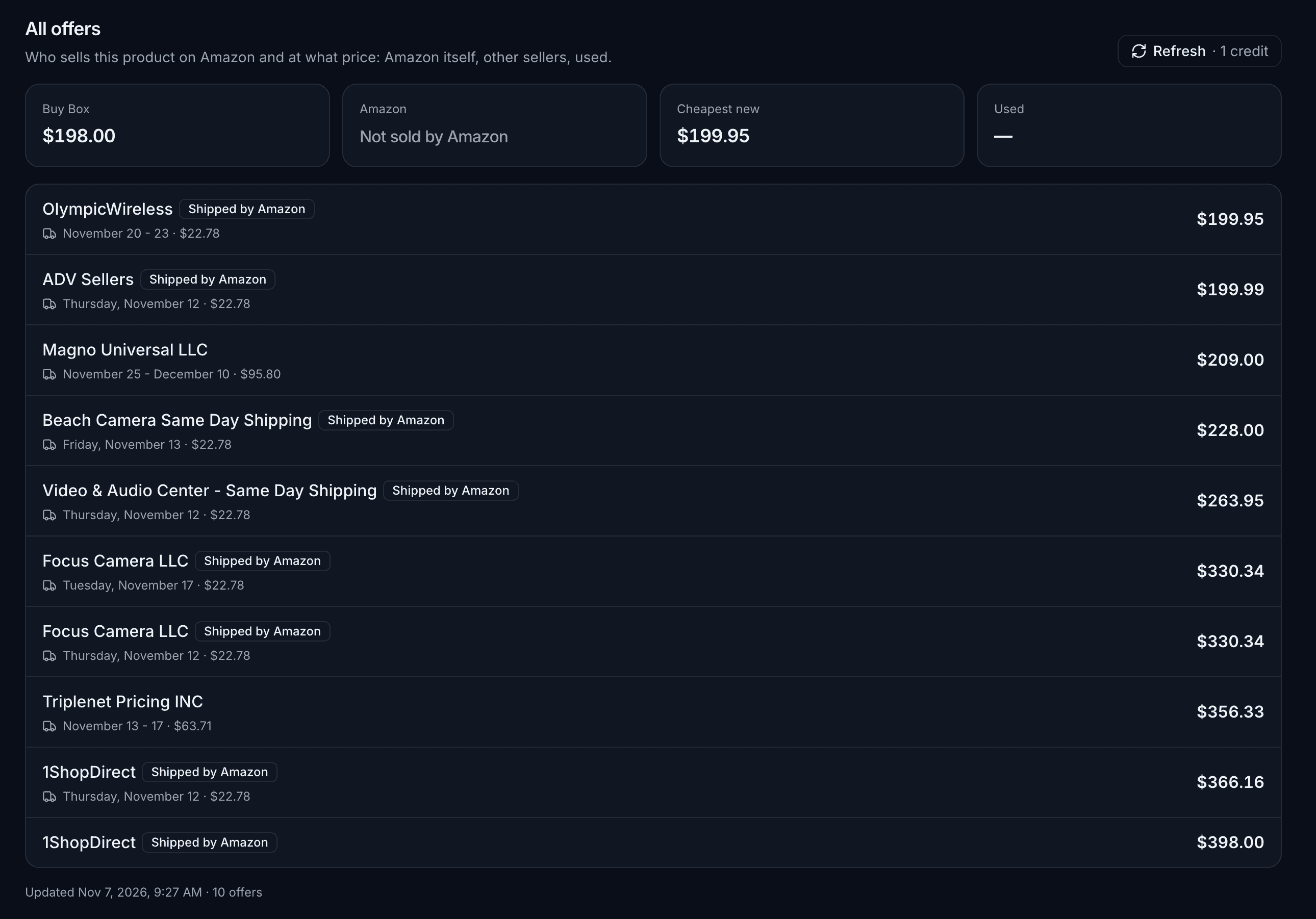
The price Asin tracks is the one in the Buy Box, the offer Amazon shows by default. If you sell on Amazon or watch competitors, you usually want more than that, and the "All offers" section covers it. It costs one credit per refresh, and it's clearly labelled "See all offers · 1 credit".
On the Sony headphones it returned four tiles (Buy Box $198.00, Amazon "Not sold by Amazon", Cheapest new $199.95, Used none) and a list of 10 offers. Each line gave the seller, a "Shipped by Amazon" tag where relevant, a delivery estimate and the shipping cost, with prices running from $199.95 up to $398.00 for the same headphones. One oddity: the $198.00 Buy Box offer itself didn't appear in that list, where Focus Camera only showed up at $330.34. It may be an offer Amazon doesn't expose in its list of sellers, but it's worth knowing if you compare the two numbers.
The extension is where Asin meets you while you shop, and it's the part the founder was keenest for me to test. It's live on the Chrome Web Store. Once it was installed, the "Connect the extension" button in the app opened a page with a single button, and one click later it said "Extension connected. You can close this tab and go back to Amazon: the Asin widget is ready." There's no key to copy: the extension receives its own, which then appears in your list of API keys.
On any Amazon product page, a small bar sits in the bottom right corner, and it changes with the product. On a product I wasn't tracking yet, it read "No price history yet" with a blue "+ Track" button. On one I was already tracking, it showed "Tracked", the latest price, and a "Target price" shortcut if I hadn't set one.
Click the arrow and the bar opens into a full panel, which is essentially the product page squeezed into a sidebar. It opens with a verdict box ("In line with the average (3 months)", with the average below it), then the current, lowest, average and highest prices, the history chart with 30-day, 3-month and 1-year views, the list of offers, the target price, the check frequency, the alert checkbox and a Save button. On the Sony headphones, the target of $179 I had set in the web app was already there, and the list of offers I had paid for earlier showed up again without costing another credit.
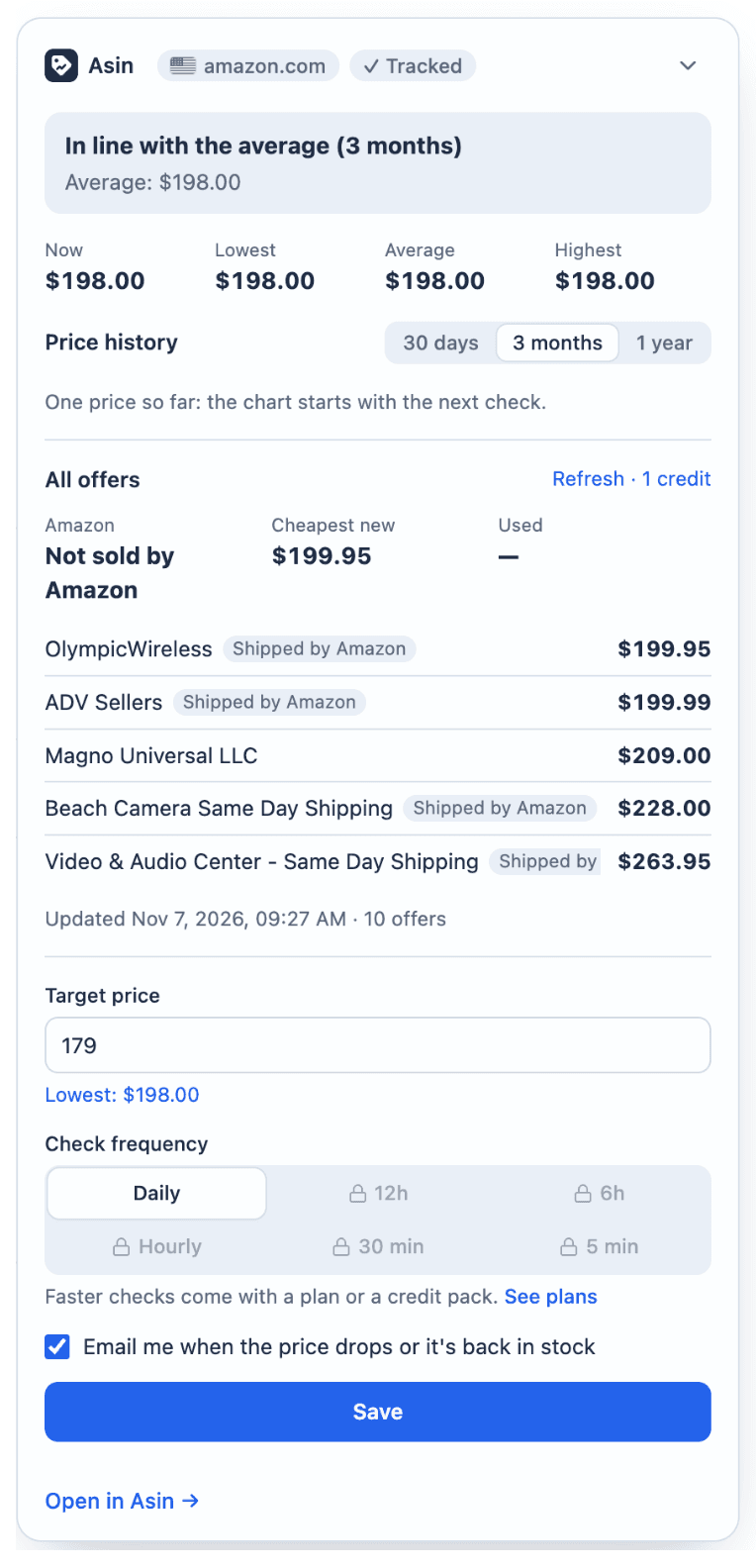
Two small moments sold me on it. With my delivery address in France, Amazon US hid the price of the headphones behind a "See All Buying Options" button, while the widget calmly displayed the $198.00 that Asin reads from the US store. And on Amazon France, the widget's €443.65 matched the price on the page to the cent.
To test tracking from the page, I opened a €18.99 headphone case on Amazon France and clicked "+ Track". The bar switched to "Checking the price…" and, after about 20 seconds, updated by itself to "Tracked · €18.99", the same price as the page. I then clicked "Target price", which opened the panel with the field already focused, typed 16 and saved. A "Settings saved." confirmation appeared on the button, and back in the web app the case was at the top of my watchlist with a "≤ €16.00" badge. The whole thing cost one credit, the first check: opening the widget on products I already tracked cost nothing.
The panel does take up a good slice of the right side of the page when it's open, but it collapses back into the small bar with one click. I didn't try the toolbar popup that, according to the website, lists your watchlist with the latest prices.
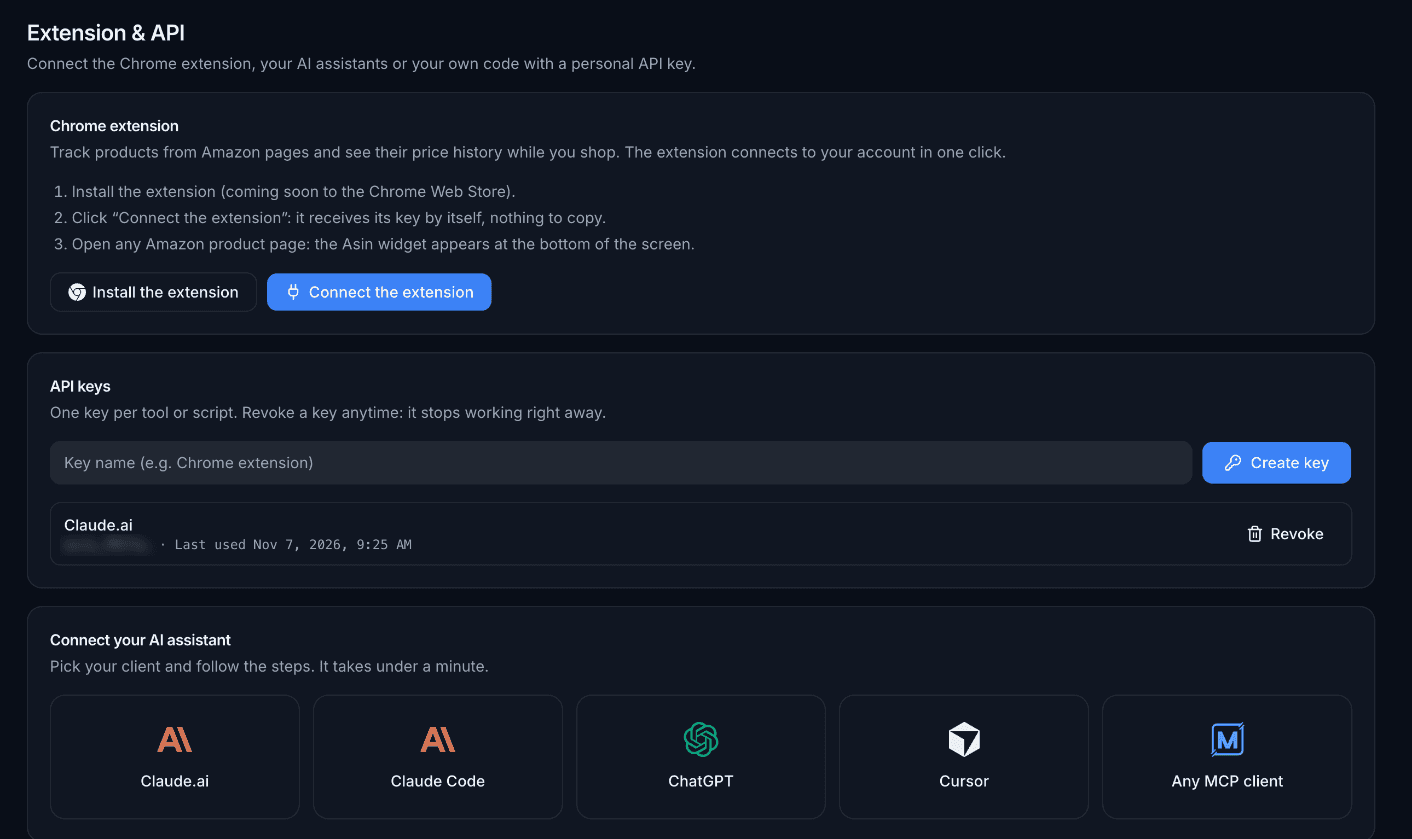
The "Extension & API" tab is the part that sets Asin apart from the classic price trackers. You create personal API keys there, one per tool, each revocable. Under them, a "Connect your AI assistant" section has one-click setups for Claude.ai, Claude Code, ChatGPT, Cursor and any MCP client, and a REST API reference lists eight endpoints with cURL, JavaScript and Python examples.
I opened the Claude.ai setup. It generated a key on the spot, warned "Copy the setup now: the key won't be shown again", and gave a server URL with the key built in, plus three steps to add it as a custom connector. Rather than wiring it into Claude, I called that MCP endpoint directly to see what an assistant would get. It listed 11 tools: account, Amazon search, tracking, listing, history, offers, updates, checks and untracking. The account tool came back with exactly what the app showed: the free plan, 1,500 credits, a limit of 50 products and a fastest interval of 1,440 minutes (daily).
Two tools stand out for anyone doing research rather than tracking. One returns the low, high and average price of any ASIN without adding it to your watchlist, and another reads the list of offers from cache for free before you decide to pay a credit for a fresh one. Asin also publishes a guide written for AI agents, with the recommended flow, the rate limits per plan and every error code. It's the kind of documentation that makes an MCP server usable in practice, not just a checkbox on a feature list.
A few more things worth knowing:
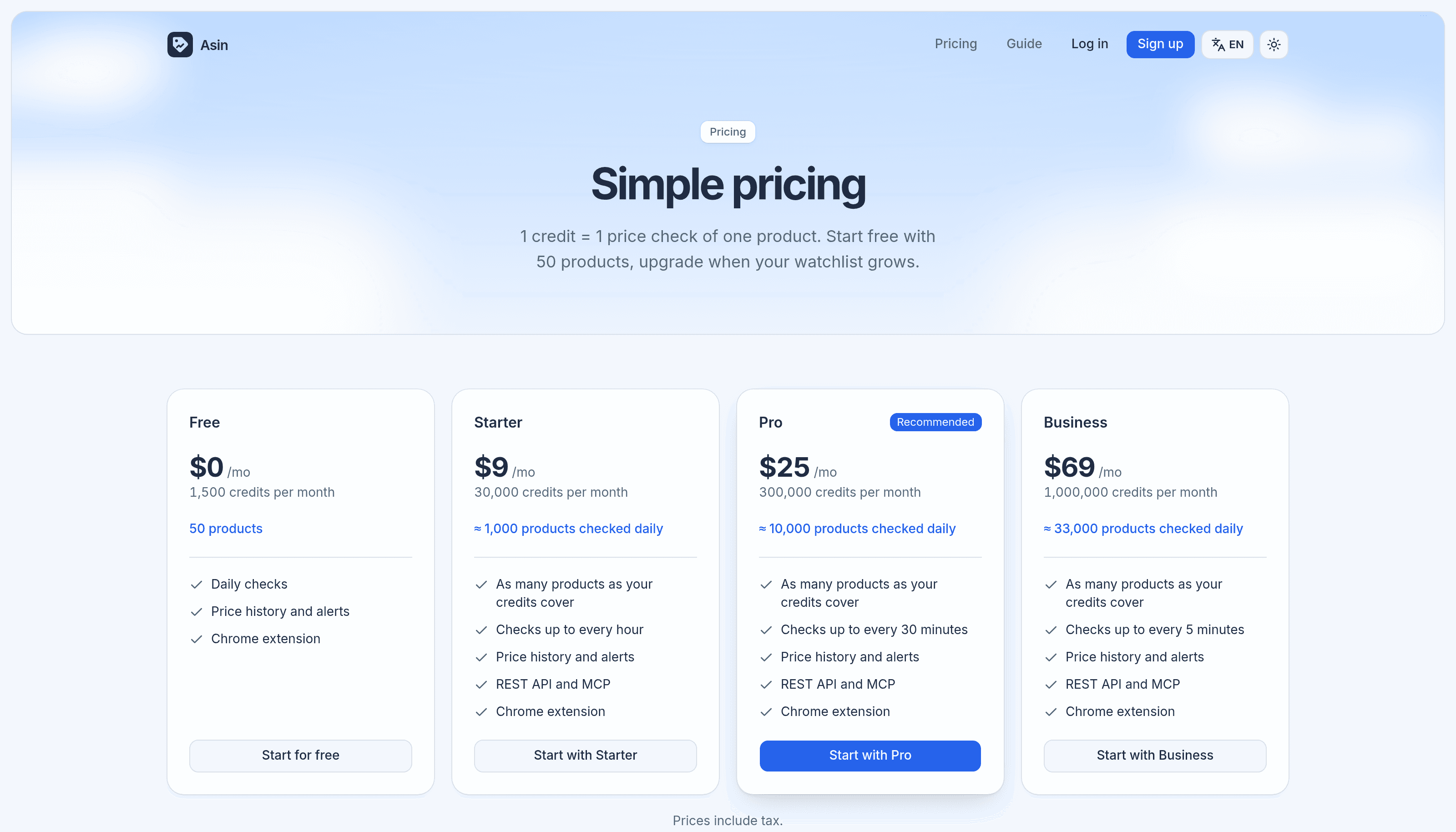
Asin sells credits, not seats. Every plan includes the price history, the alerts and the extension, and paid plans have no product limit: you track as many products as your credits cover. The pricing page lists the REST API and MCP server from Starter upwards, yet my free account could create a key and call the MCP server without any trouble. Prices are in US dollars and include tax, and you can pay in USD or EUR through Stripe.
| Plan | Price | Credits / month | Roughly | Fastest check |
|---|---|---|---|---|
| Free | $0 | 1,500 | 50 products daily | Daily |
| Starter | $9 / month | 30,000 | 1,000 products daily | Every hour |
| Pro | $25 / month | 300,000 | 10,000 products daily | Every 30 minutes |
| Business | $69 / month | 1,000,000 | 33,000 products daily | Every 5 minutes |
If you'd rather not subscribe, there are credit packs: 30,000 credits for $15, 300,000 for $42 and 1,000,000 for $119. They cost more per credit than a plan, stay valid for 6 months, and unlock hourly checks. Monthly credits don't roll over, and packs are only used once the monthly allowance runs out.
The frequency is what drives the bill. A daily check costs about 30 credits a month per product, an hourly one about 720, and a 5-minute one about 8,640. The pricing page has a small calculator where you enter a number of products and a frequency, and it tells you which plan covers it.
If you mainly want to know whether today's price is a good one, Asin isn't there yet: without a history going back months, there's nothing to compare against on day one. And if you only follow two or three products before a big purchase, a free extension with an existing archive will tell you more.
That's also how it compares with the usual names. Keepa and CamelCamelCamel have been reading Amazon for years, so their charts go back a long way the moment you open them. Asin starts from your first check, but it's built around what they put second: per-check pricing with no seats, refunded failures, offers by seller, and an API and MCP server that treat your watchlist as data you can query.
What I liked most about Asin is how carefully the basics are handled. The credit model is easy to follow and the app keeps showing you what each choice costs. Failed checks really are refunded, and a product added to the wrong store gets a clear way out instead of a dead row. The offers list goes further than the Buy Box, and the target price, with its "$19.00 to go" bar and line on the chart, is a small piece of design that makes the whole thing pleasant to use. The Chrome extension carries all of that onto Amazon's own product pages, in sync with the app. The API and MCP server are first-class rather than an afterthought, with a guide written for agents. The main limit is time: the history starts with your first check, so the tool gets more useful the longer you use it.
If you watch Amazon prices for work or before a purchase, Asin is worth trying on the free plan: 50 products checked daily, no card needed.
What I liked:
Things to keep in mind:
Start tracking with Asin and let the price come to you.
Reviewed product
Track Amazon prices, drops and history with alerts
Category
BusinessPricing
Freemium