Reviews
ScreenKite Review - The Mac Screen Recorder Your AI Agent Can Edit
We've tested ScreenKite, a native Mac screen recorder and video editor that hands its timeline to your own AI agent, with auto zoom, 3D device mockups and on-device captions.
We've tested BlogSEO, an SEO automation tool that researches keywords, writes and publishes blog articles, trades backlinks through a non-reciprocal network and lets Claude or ChatGPT run it over MCP.
Welcome to this BlogSEO review ✨
Every founder knows the blog is the SEO channel they should be running, and almost nobody runs it. Writing one good article a week already eats a day, and that's before keyword research, internal links, images, meta descriptions, publishing, and the slow, awkward work of getting other sites to link to you. So the blog sits there with four posts from launch week, and the traffic goes to whoever kept going.
BlogSEO is an SEO automation tool built to keep going for you. You give it your website, it picks the keywords, fills a content calendar, writes and publishes an article a day to your CMS, and places backlinks to your site through an exchange network with other BlogSEO users. Quick note on the name, since it comes up: BlogSEO lives at blogseo.io and has nothing to do with blogseo.ai, which is a different company.
The BlogSEO team asked me to focus on two things: the backlink exchange, and the MCP server that lets Claude, ChatGPT or Cursor drive your account. I tested both, along with the whole writing pipeline, by creating a fresh account on the Ambition plan and pointing it at Uneed itself.
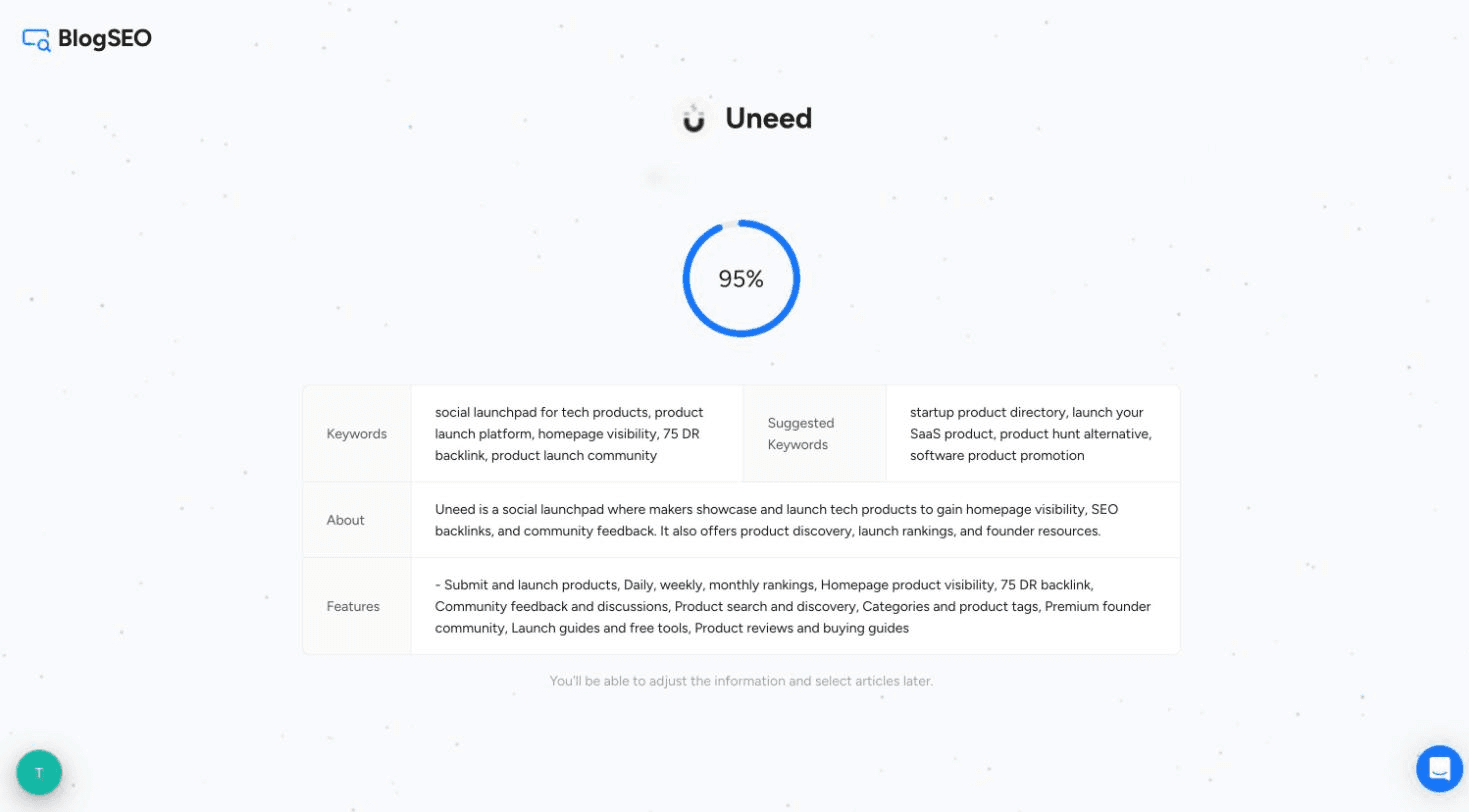
Setup starts with a single field: your website. I typed Uneed's domain and BlogSEO went to work.
The second step asks you to connect Google Search Console, flagged as "strongly recommended". With it, BlogSEO skips keywords you already rank for, so new articles don't compete with your existing pages. It's read-only, but I didn't want to hand over Uneed's search data for a test, so I clicked "Skip for now". Everything below works without it. You lose the cannibalization checks and the ranking data, and you can connect it later from the integrations page.
Then BlogSEO scanned the site for about 30 seconds and came back with a summary that was genuinely accurate: Uneed described as a launchpad where people showcase tech products for visibility, backlinks and feedback, a list of features that included the daily, weekly and monthly rankings and the 75 DR backlink, and a first set of keywords such as "product hunt alternative" and "startup product directory".
After that comes the paywall. BlogSEO starts with a 3-day free trial on the Ambition plan, and it asks for a card upfront. Two things are worth knowing about the trial: the backlink exchange is locked until you pay, and you get 3 AI brain credits instead of the 15 a paid month includes. Credits are what the AI features spend, and you'll see me spend a few of them below.
The first time you open the Keywords page, it's empty, with a "Get AI recommendation" button. One click and 1 AI brain credit later, about 20 seconds, I had 36 keywords, each with an opportunity label, a competition level, a monthly volume and a 12-month trend sparkline. A Map view groups them into topic clusters, 15 of them in my case.
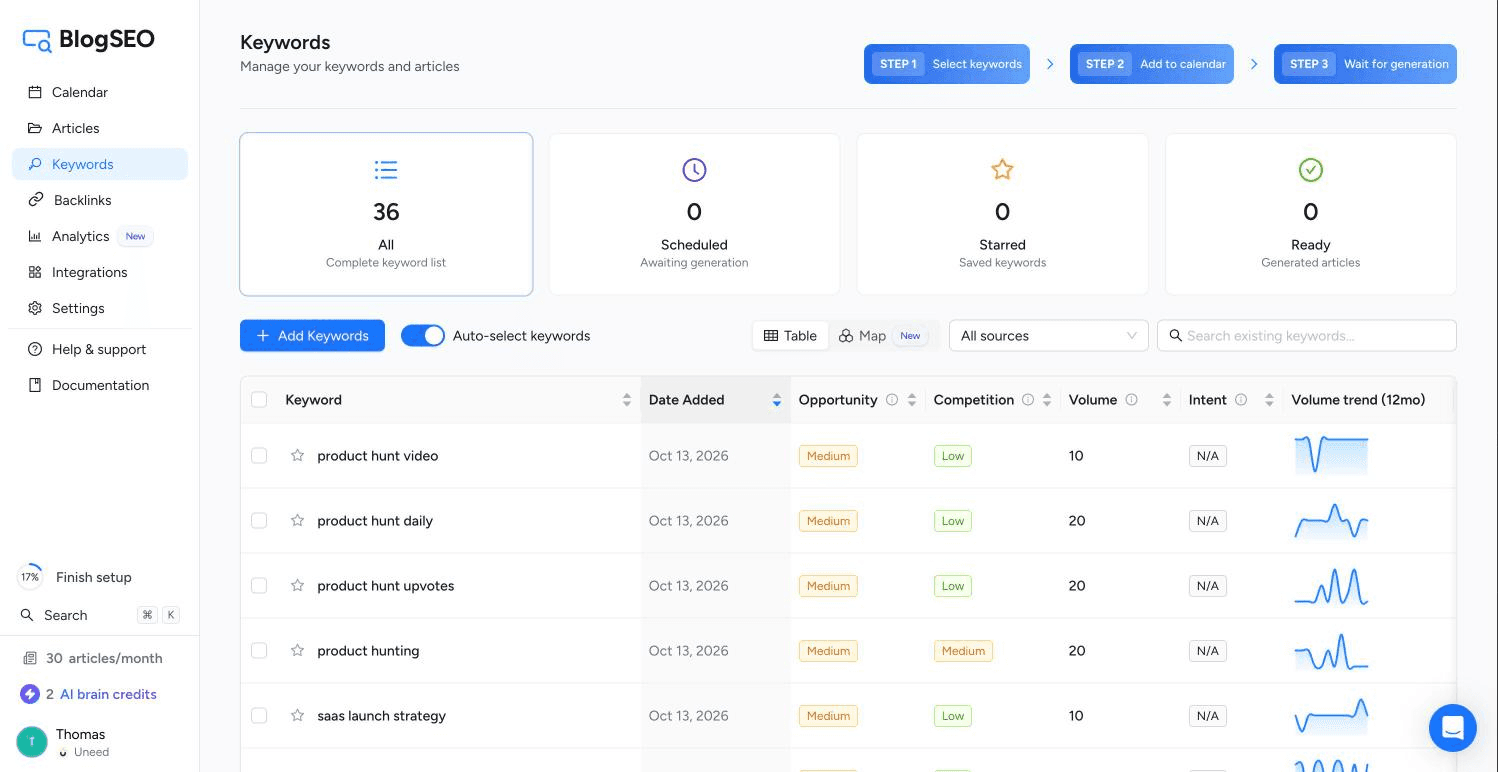
The list was relevant, if modest. Most of the keywords are small, 10 or 20 searches a month, with a couple of better ones like "website for products" (320) and "launching a new product" (590). That's not a flaw so much as the reality of a niche: there are only so many people searching for launch platforms. BlogSEO clearly favours low-competition keywords a site can actually win, rather than fat head terms it never will. It also suggested three competitors for the settings page, and it picked BetaList, Microlaunch and Peerlist, which is exactly who I'd have named.
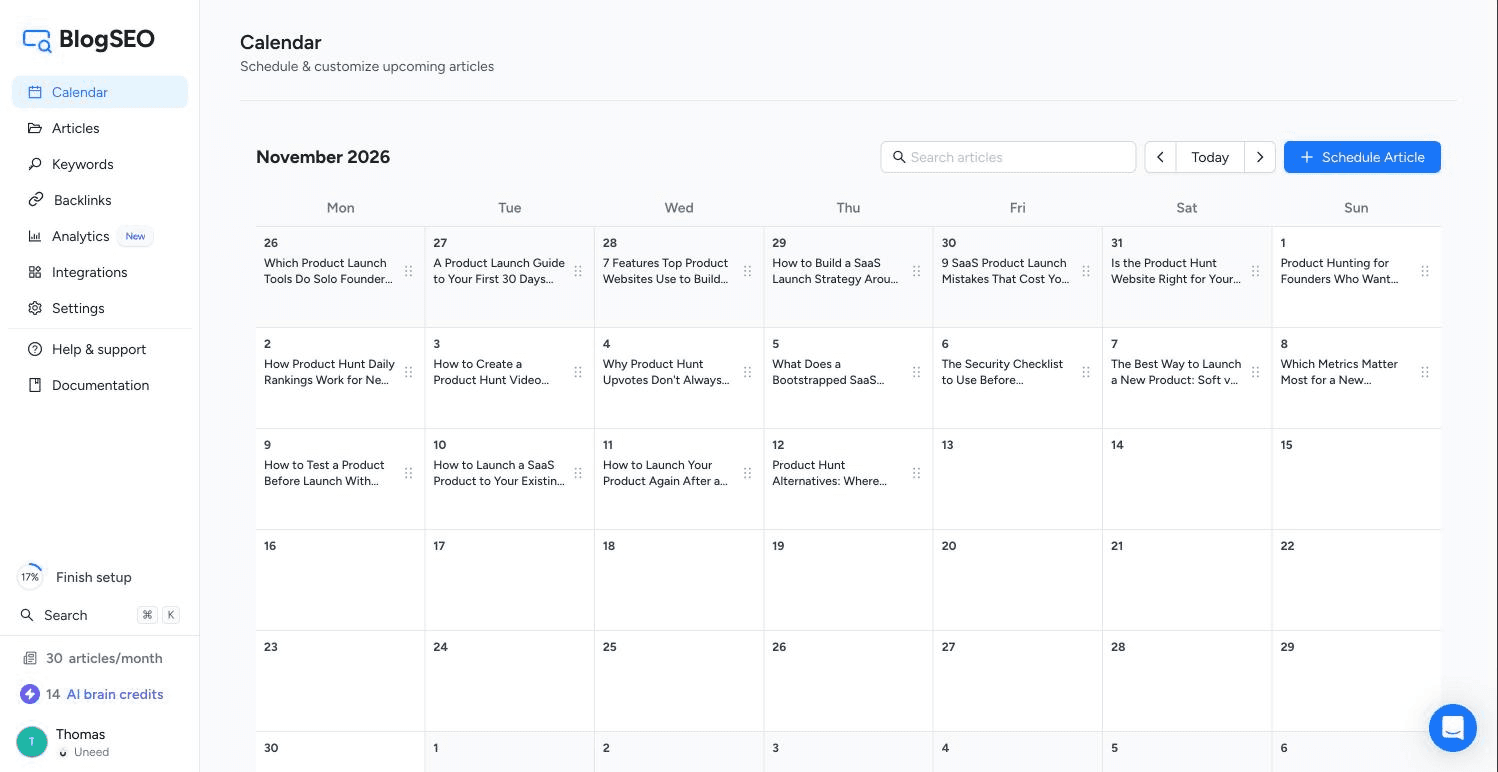
Meanwhile, the calendar filled itself. With the "Auto-select keywords" toggle on, BlogSEO picks keywords and writes a headline for every day, and within a few minutes I had a month of titles like "How to Choose a Website for Products You Want to Showcase" and "Why Product Hunt Upvotes Don't Always Lead to Paying Customers".
Each slot opens a "Customize Upcoming Article" panel where you can change the title, write a content brief of up to 12,000 characters, attach a reference document, or swap the keyword. The panel also tells you when the article will be generated, in my case at 2 AM the day it's due.
The first article was ready a few minutes after checkout: "How to Choose Product Launch Software for a Small Team", targeting "product launch software". It came in at about 1,950 words, with ten sections, two comparison tables, a five-question FAQ, a cover image and an inline image.
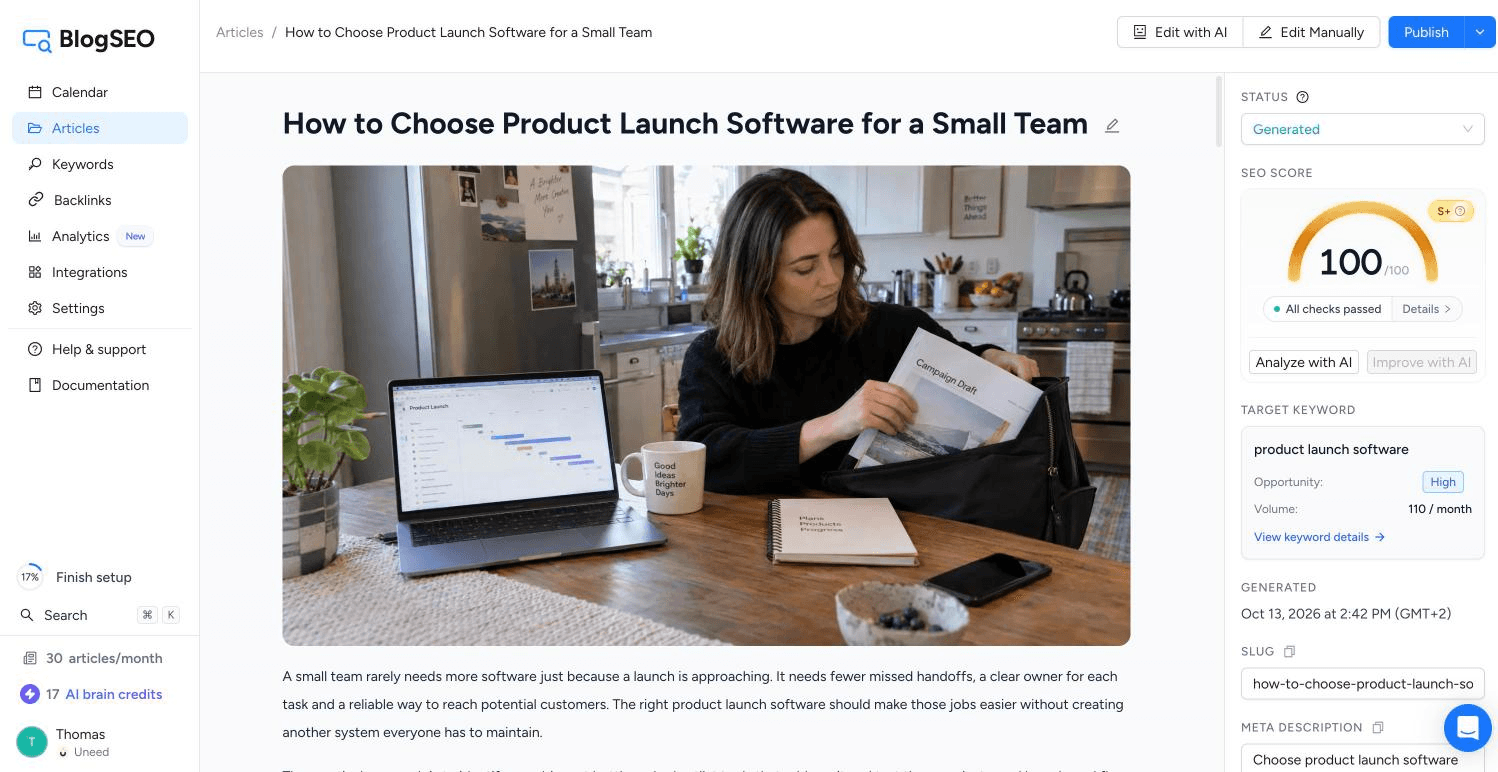
The writing is good. It's calm, practical and doesn't oversell, it uses tables where a table helps, and where it gives an example cost it explicitly labels the numbers as hypothetical rather than inventing a price for a real product. What impressed me most was the linking. Without being told, the article linked to two real reviews on the Uneed blog, the Bento review in a passage about email follow-up and the Refiner review in a passage about in-app surveys, and both fit the context. It also cited a Google Analytics help page as an external source. BlogSEO had clearly read the site's sitemap and used it.
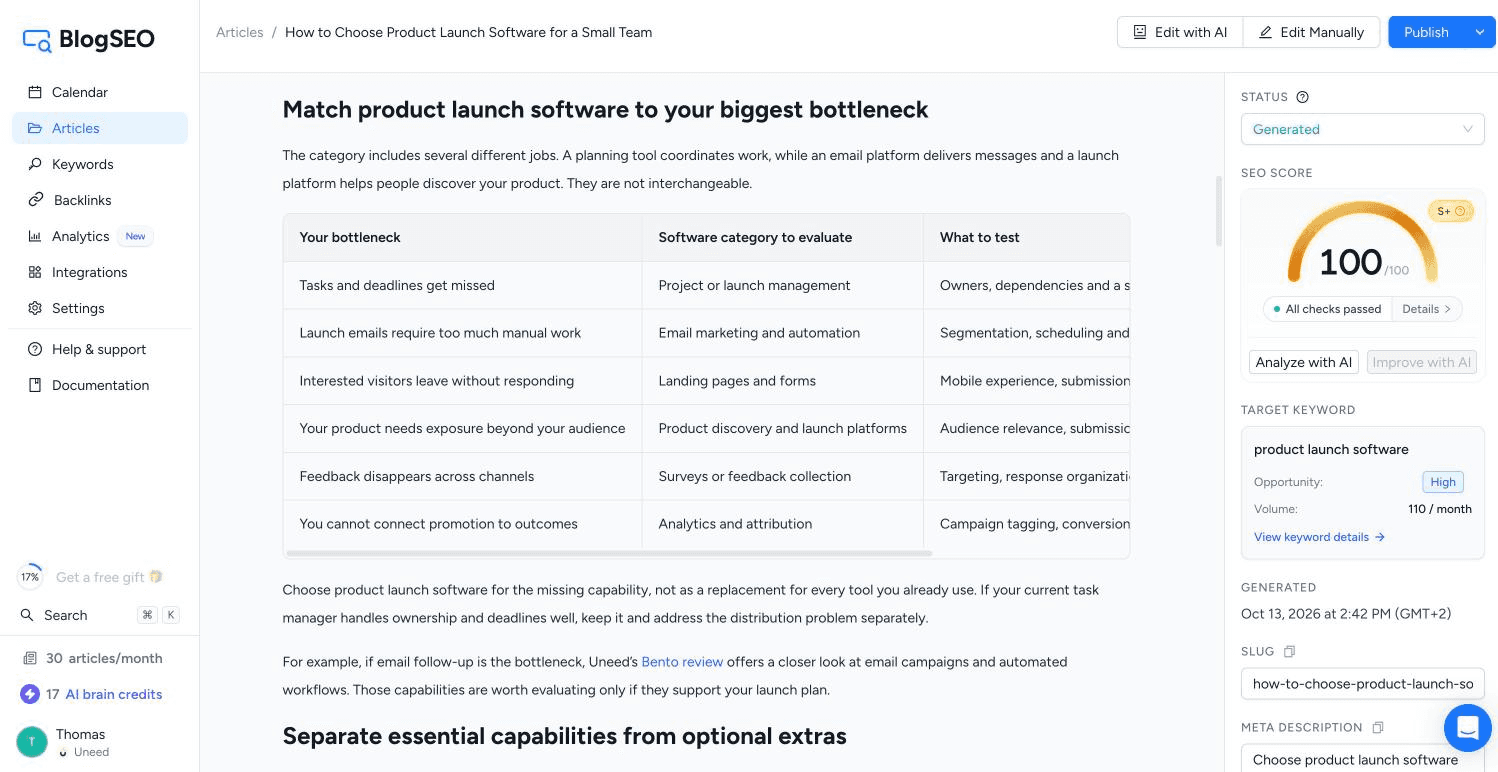
On the right, an SEO panel scores the article. Mine scored 100/100, graded S+, with 19 checks passed: keyword in the title, intro, slug, meta description and image alt, a 0.51% keyword density, length, links, FAQ, paragraph and sentence length, and so on. That score should be read for what it is, though: a checklist the article was written to pass.
The more interesting button is "Analyze with AI". For 1 credit, it reads the pages that rank on Google for your keyword and compares your article against them. I ran it, and the score dropped to 59, graded C, with 18 suggestions. The feedback was specific and fair: competitors organize their guidance into pre-launch, launch-day and post-launch stages, they cover audience research and positioning, and they include an actual launch checklist, all things my article didn't have.
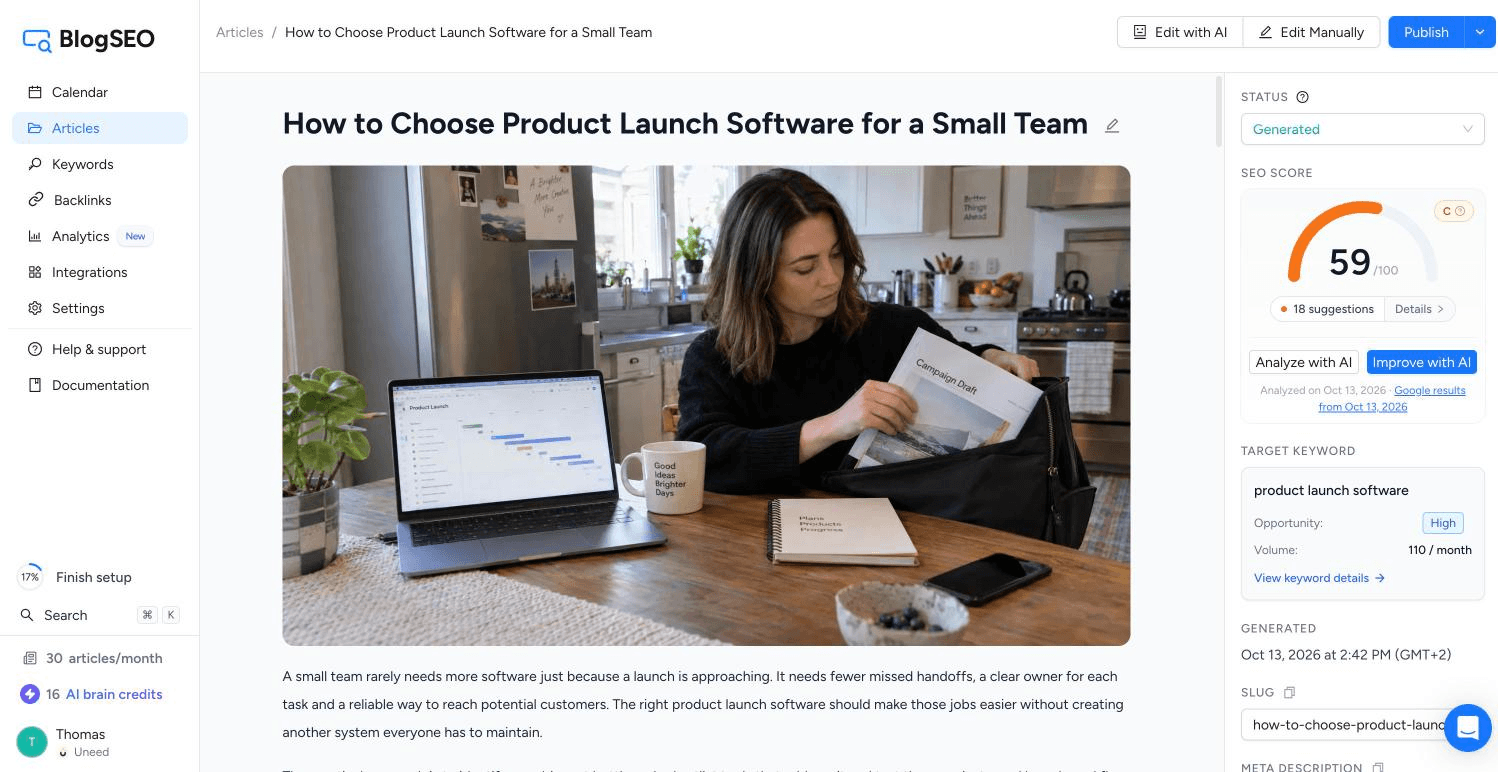
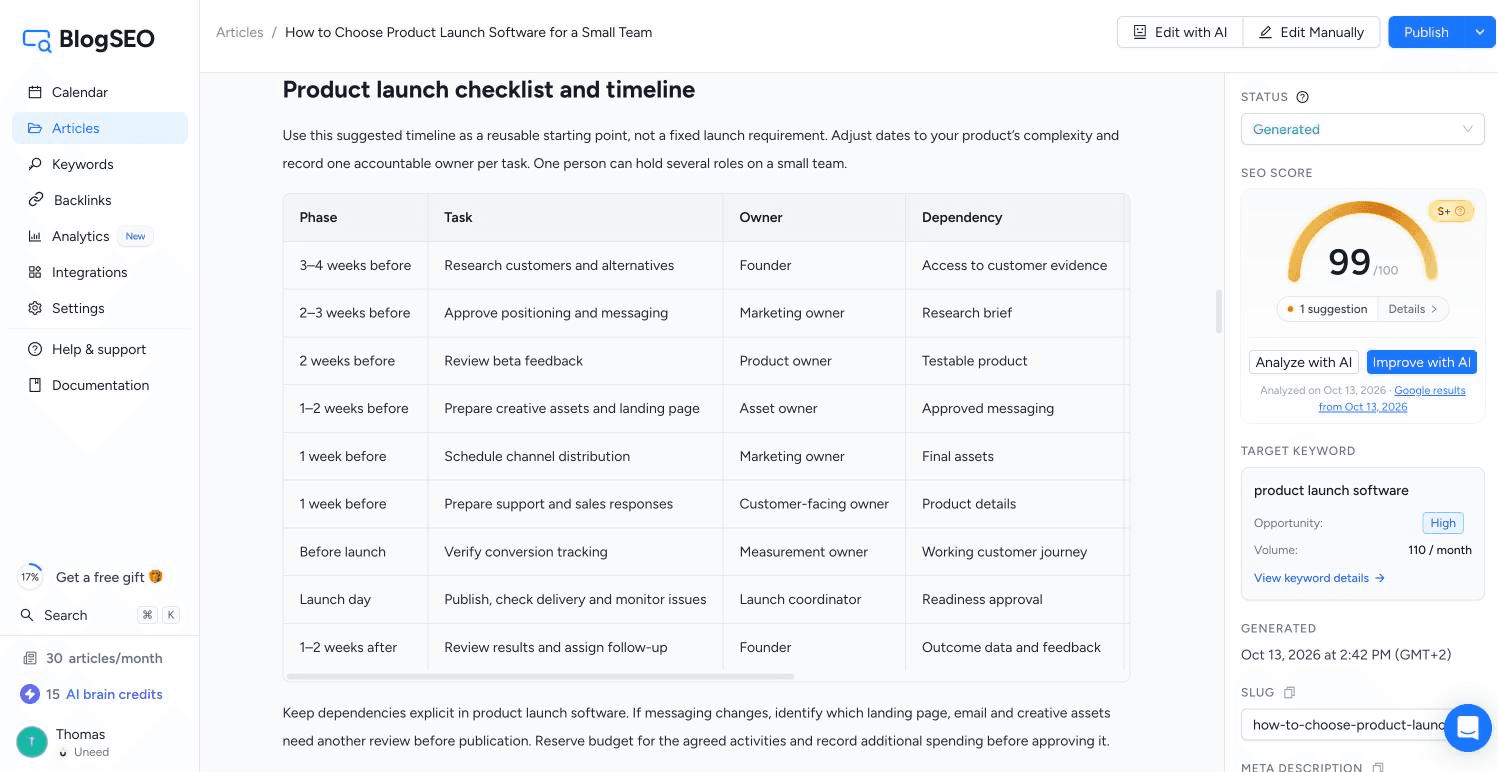
I like that BlogSEO shows you this instead of letting you sit on a flattering 100. Then "Improve with AI" closes the loop. It pre-fills a rewrite instruction from the suggestions, which you can edit, and charges 1 more credit. About a minute and a half later, the article was back at 99/100 with four new sections, including a "Product launch checklist and timeline" table running from three weeks before launch to two weeks after, and it had grown to about 3,200 words.
This is the feature BlogSEO's founder wanted me to look at first, and it's the one that makes BlogSEO more than an article generator.
Every BlogSEO member who publishes articles also hosts links in them. Each month, your subscription gives you backlink credits, and BlogSEO spends them by placing links to your site inside other members' articles, matched by niche. Your own articles host links to other members in return. The important word on the page is "non-reciprocal": BlogSEO says its algorithm keeps the link graph sparse, so site A never simply links to site B and back, which is the pattern search engines look for in link schemes.
The rules are clear once you dig into them:
There are two requirements to take part: a paid subscription, and a connected publishing integration, because your site has to host links too. On my test account, BlogSEO credited 100 backlink credits as soon as the trial ended, but the exchange stayed locked behind a "Connect an integration to receive backlinks" message, because I didn't connect Uneed's blog. Keep that in mind: the backlinks are part of a deal where BlogSEO publishes on your site, not a separate service.
Links also take time: a placement can take up to about ten days to be verified, so a fresh account can't show you much. To see the exchange after a few months, BlogSEO gave me access to a test account that has been running on a cashback comparison site since late 2025. I've blurred the site's name in the screenshot.
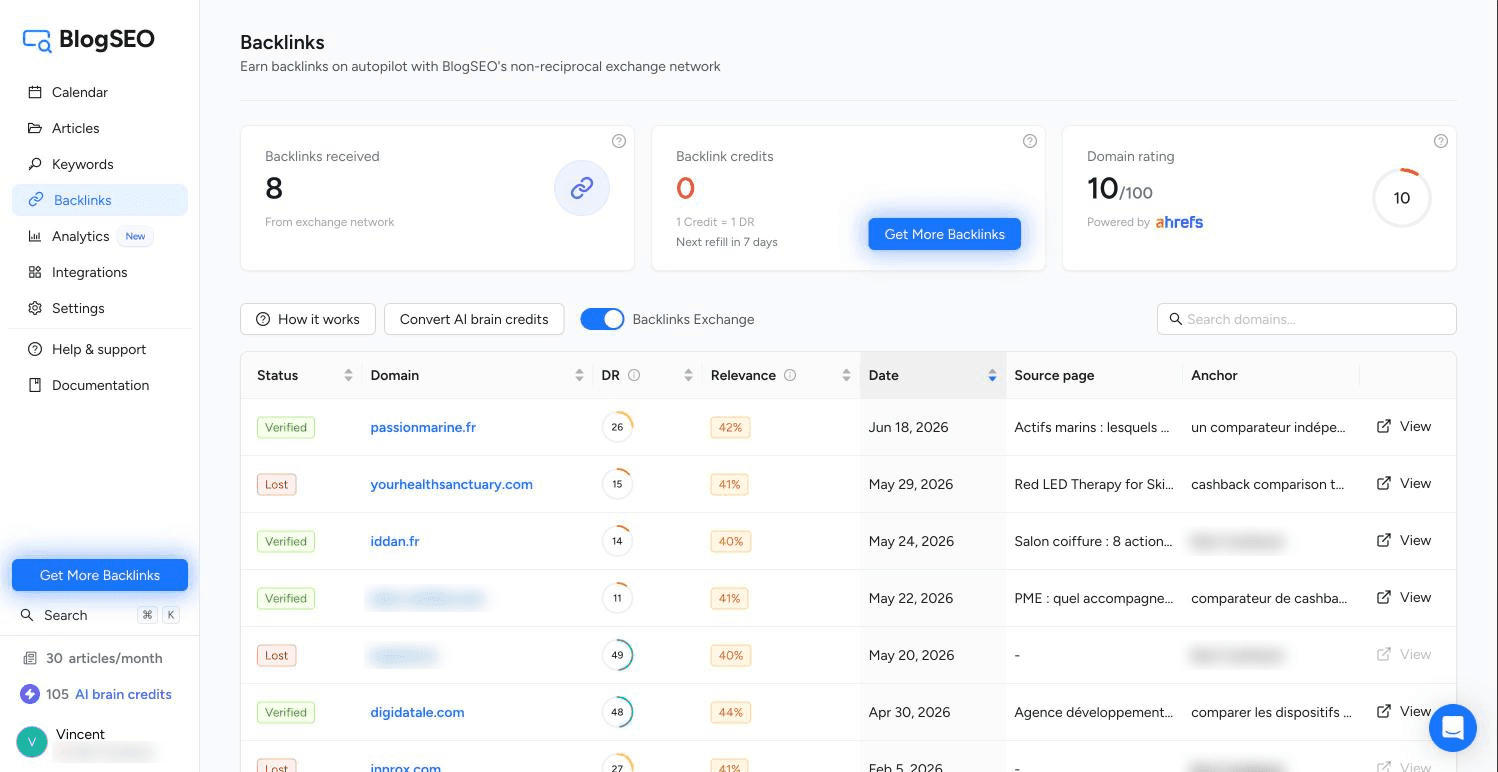
Between December 2025 and June 2026, BlogSEO placed 15 links to it. Eight are verified and seven were lost, with their credits returned. The verified links come from sites with a DR between 11 and 48, and the anchors vary nicely, from the brand name to phrases like "comparateur de cashback indépendant" or "comparer les dispositifs de cashback existants".
The table is also honest about relevance. BlogSEO rates every one of these matches between 40% and 49%, and the source articles are about skincare, hair salons, budgeting, payment anomalies and web development agencies. I opened one, an article about scoping a web development project, and the link sits in the body, in a paragraph about loyalty programs, where cashback is a plausible but passing mention. That's what you should expect from the exchange in a small niche: real, in-content links on small and mid-sized sites, rather than links from sites in your exact field.
The second feature on the founder's list is newer and, for me, the most fun. BlogSEO runs an MCP server, so an AI assistant can work inside your account. The setup page has a tab per client (Claude, Claude Code, ChatGPT, Cursor and Codex CLI) and a single server URL, and the sign-in is OAuth, so there's no API key to copy anywhere.
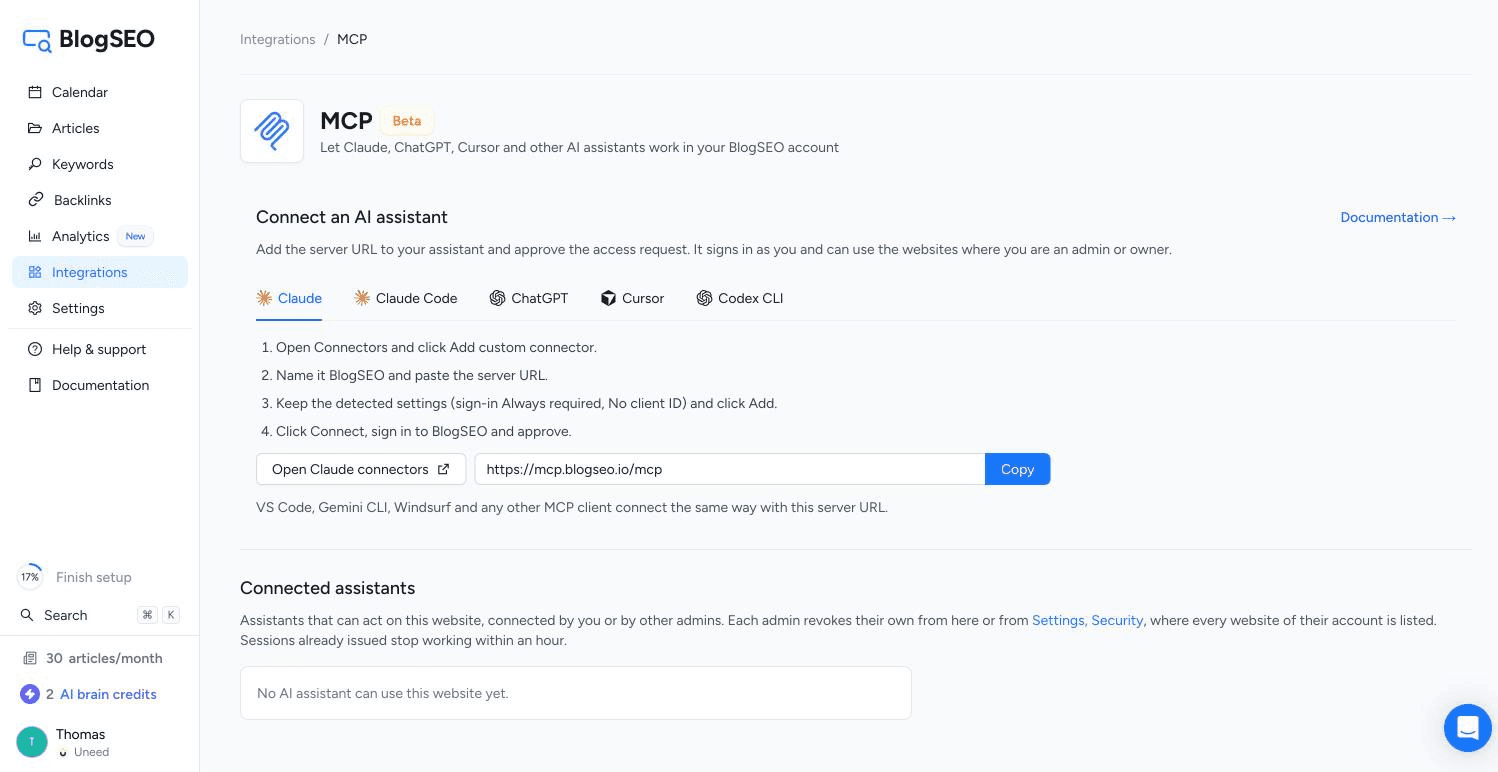
I added it to Claude as a custom connector, approved the access, and Claude got 52 BlogSEO tools: keywords, calendar, articles, SEO checks, backlinks, settings and integrations. Then I gave it real work.
It started with get_account to read the plan and credits, then checked the Domain Rating of the three competitors BlogSEO had suggested (BetaList and Peerlist at 77, Microlaunch at 64). When I asked for keyword research around "product hunt alternative", the first call didn't spend anything: it answered that the research costs 1 AI brain credit and that I had 15, and only ran after an explicit confirmation. It added 10 keywords, including "product hunt alternative" itself, at 110 searches a month and a difficulty of 15.
The best moment came when I asked Claude to schedule an article on that keyword for October 20, with a brief. The server refused, said that day already held an article and that the site publishes one a day, named November 12 as the next free date, and offered to move the existing article instead. Claude rescheduled for November 12, and the article showed up in the calendar with its headline, keyword and brief, as you can see in the calendar screenshot above.
That's the right design for a tool that can spend credits and publish to a live site. Paid actions ask for confirmation, and according to the server's own instructions, publishing works the same way: the first call only shows where the article would land, and nothing goes live until you confirm. I didn't test publishing, since I had no integration connected. One thing to know when you connect it: the access covers every website where you're an admin or owner, including ones you add later, not just the site you're working on. You can revoke it in one click from the same page.
A quick roundup of what else is in BlogSEO, which I didn't test in depth:
BlogSEO is built around one main plan, Ambition, with a cheaper Starter plan you can downgrade to. Prices are in USD.
| Plan | Price | Articles | What's included |
|---|---|---|---|
| Ambition | $97/month, $495 every 6 months or $889/year | 30 a month | Up to 5 a day, 100 backlink credits and 15 AI brain credits a month, 1 website, MCP |
| Starter | $59/month | 15 a month | One article every other day, available as a downgrade from Ambition |
| Custom | On request | Custom | For agencies, white-label partners and multi-site owners |
The add-ons, priced per website: AI Visibility at $89/month, Premium Backlinks at $149/month for 500 extra backlink credits, and $29/month per extra article language. AI brain credits can be topped up when you run out.
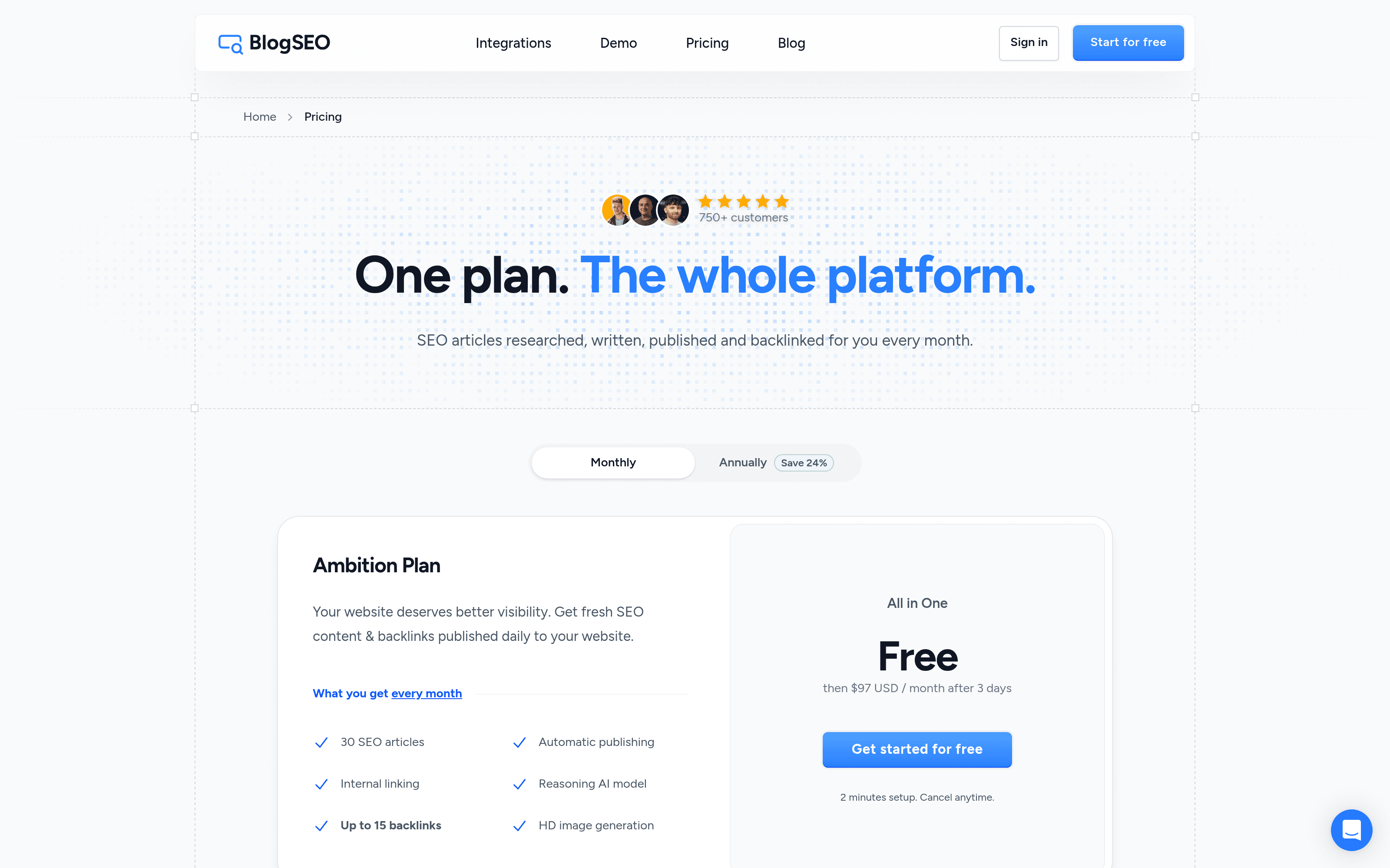
The trial lasts 3 days, needs a card, and charges nothing until it ends. Your first payment is refundable within 48 hours, you can cancel anytime, and the backlinks you've received stay live after you cancel. Given that one decent freelance article often costs more than a month of BlogSEO, the price is easy to justify if you'll actually publish what it writes.
If you're comparing SEO automation tools, you're probably also looking at Outrank and SEObot, which follow the same idea of writing and publishing articles for you on autopilot. Writing assistants like Surfer or Frase are a different category: they help you write and optimize, but you still do the writing. BlogSEO's pitch is to do the whole loop, from keywords to publishing to links, with a competitor benchmark you can act on and an MCP server for people who'd rather drive it from their AI assistant than from a dashboard.
BlogSEO makes sense if you're:
If you want full control over every word and every link, or your site's voice is something you'd never hand to an AI, BlogSEO is the wrong tool, or at least you should plan on editing before anything goes live. The same goes if you don't want an outside service publishing on your domain: the backlink exchange depends on it.
What I liked most about BlogSEO is that it's honest with you about its own work. It writes a solid article, scores it 100, then lets you benchmark it against Google and drops the score to 59 so you can see what's missing. The fix costs one credit and a minute and a half. The writing reads well, the internal links were relevant enough that I'd keep them, and the MCP server is one of the better ones I've used, with confirmations on anything that costs credits or touches your site.
The backlink exchange is the part that needs the most trust, since it only works if BlogSEO publishes on your site and you can't choose who links to you. On the account I looked at, it delivered real in-content links with varied anchors, from sites that were only loosely related. The rules are clear, the network is non-reciprocal by design, and lost links refund themselves.
What I liked:
Things to keep in mind:
If your blog has been on the to-do list for a year, BlogSEO is worth the three-day trial, even just to see what it writes about your site.
Reviewed product
Rank #1 on Google & ChatGPT on autopilot.
Best reward

Category
MarketingPricing
Freemium