The 6 Best Instapaper Alternatives in 2026

6 products compared · 13 community reviews · Updated October 2026

Most people looking for an Instapaper alternative are not unhappy with reading itself. They are unhappy with the queue. Saved articles pile up and rarely get read. Links end up in one app while notes, PDFs and screenshots live somewhere else. Some people also want their saved material stored on their own machine instead of in someone else's cloud.

The tools below take different approaches to those problems. Some act as a personal library where links sit next to ideas and files. Some turn bookmarks into visual boards or feeds. One puts what you saved on a physical display so it stops hiding behind an app icon.

We ranked them on how well they handle saving and coming back to things later, using product details, community votes and what Uneed reviewers say.

Our picks at a glance

  1. 1.Resurf: Best for a local library on Mac
  2. 2.Luckynote: Best for saving everything in one place
  3. 3.WebBoard: Best for visual, shareable bookmark boards
  4. 4.Observely: Best for following favorite writers
  5. 5.inklet: Best for actually revisiting saved notes
  6. 6.Saner.ai: Best for finding saved info without organizing
Logo of Resurf
🥇

1. Resurf

Resurf is a macOS app for quickly capturing links, ideas, PDFs, images and videos, then finding them again later. You can capture without switching windows, sort items from an Inbox into Spaces, tags and notes, or leave organizing for later. Everything stays in your local file system rather than the cloud, which suits people who want full control over what they save. It is in beta, and its resurfacing features are still being shaped by early user feedback.

Pros
  • Captures links and files without leaving the window you are in
  • Search by keyword, type, tag, color, date or Space, plus a Spotlight-style quick search panel
  • Stores everything locally with no cloud dependency
  • Uneed reviewers praise its level of craft and native polish
Cons
  • macOS only
  • Still in beta, with resurfacing features in progress

#1 Product of the Day#2 Product of the Day
104
2 reviews
Best for a local library on MacPaid
Logo of Luckynote
🥈

2. Luckynote

Luckynote lets you message yourself notes, tasks, links and files, then search and organize them. It works like texting yourself, with organization tools on top. Uneed reviewers say all their digital content ends up there, and one mentions Instagram reels being downloaded and transcribed automatically. It suits people whose saved links are mixed in with to-dos and ideas.

“I've been using Luckynote for a while now. It's an amazing tool that helps me organize my life and all my digital content. Imagine you're texting yourself everything, it's that simple, you just get some superpowers on top!”, @svetlana.miljanovic.91-808d on Uneed

Pros
  • Familiar send-it-to-yourself capture flow
  • Handles notes, tasks, links and files together
  • Uneed reviewers say it is simple yet full of thoughtful details
  • Reviewers report saved reels are downloaded and transcribed
Cons
  • Messaging-style capture is a different habit than a reading queue
  • Built for broad capture, so links share space with tasks and notes
14
(7)
Best for saving everything in one placeFreemium
Logo of WebBoard
🥉

3. WebBoard

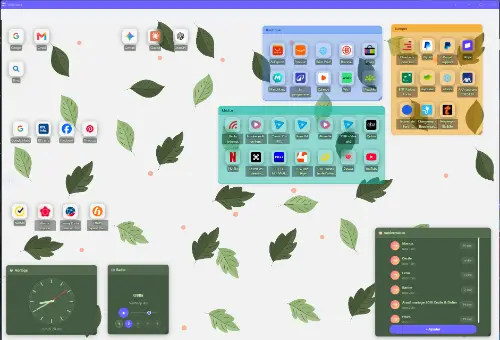
WebBoard turns your bookmarks into visual desktops you can share, with no ads and a free plan. It fits people who want to see saved links at a glance and group them by topic instead of scrolling a list. Uneed reviewers like how simple and lightweight it is.

Pros
  • Visual boards make saved links easy to scan
  • Boards can be shared with others
  • No ads, with a free plan
  • Uneed reviewers highlight its simplicity and light weight
Cons
  • A reviewer would like it to stay on the desktop as an always-on-top window
  • Organizes links rather than offering a reading view
#1 Product of the Day
101
1 review
Best for visual, shareable bookmark boardsFreemium
Logo of Observely

4. Observely

Observely is a personal dashboard where you can organize feeds. A Uneed reviewer uses it to group favorite Medium writers into categories and share those feeds publicly. It suits readers who want to keep up with sources over time rather than save one article at a time.

“I recommend this app as I am a user. I love how you can organize your feeds. This makes me categorize my fab medium writers and even share them publicly. I basically promote medium articles this way as Observely lets you share feeds as a public resource...smart idea.”, @nedim-hadzimahmutovic on Uneed

Pros
  • Organize feeds into categories on one dashboard
  • Feeds can be shared publicly
  • Uneed reviewers use it to curate and promote writers they like
Cons
  • Focused on feeds and sources more than saving individual articles
#3 Product of the Week#1 Product of the Day
9
1 review
Best for following favorite writersPaid
Logo of inklet

5. inklet

inklet puts your second brain on ambient e-ink displays, so saved notes stay visible instead of disappearing into an app. It speaks directly to the read-later problem of saving things you never return to. Uneed reviewers call that framing the real insight and like the idea of an always-visible display.

“The "later rarely comes" framing is the real insight here, and putting saved notes on an ambient display instead of behind another app icon is a smart fix. Does it pull directly from Obsidian and Notion?”, @zain-sheikh on Uneed

Pros
  • Keeps saved notes in view on an ambient display
  • Tackles the saved-but-never-revisited problem head on
  • Uneed reviewers find the approach a smart fix
Cons
  • Needs an e-ink display, so it is not a pure software swap
  • Reviewers have questions about which note apps it pulls from
#3 Product of the Week#1 Product of the Day
108
2 reviews
Best for actually revisiting saved notesPaid
Logo of Saner.ai

6. Saner.ai

Saner.ai helps you capture information instantly, find it again and extract insights without manual organizing. It suits people who stopped using Instapaper's folders and tags because they never kept them up. It works as a personal assistant for notes more than an article reader.

Pros
  • Instant capture with no filing required
  • Built to find and extract insights from what you saved
  • Good fit if you dislike maintaining folders and tags
Cons
  • Leans toward notes and insights over long-form reading
#1 Product of the Week#1 Product of the Day
13Best for finding saved info without organizingFreemium

Side-by-side comparison

ProductCapture styleOrganizationComing back to saved items
ResurfQuick capture without switching windowsInbox, Spaces, tags, notesFiltered search and quick search panel
LuckynoteMessage yourselfSearch and organizeSearch across everything saved
WebBoardBookmarksVisual desktopsScan boards at a glance
ObservelyFeedsCategorized dashboardBrowse feeds by category
inkletSecond-brain notesShown on e-ink displaysAmbient, always-visible
Saner.aiInstant captureNo manual organizingFind and extract insights

Why people switch from Instapaper

The most common reason is the backlog. A read-later queue is easy to fill and hard to empty, and after a while it becomes a list of good intentions.

The second reason is fragmentation. Articles are only part of what people want to keep. Ideas, PDFs, screenshots, videos and tasks often end up in other apps, so finding something means checking several places.

The third is control. Some people want saved material stored locally or organized in a way that matches how they think, such as visual boards or feeds.

How to choose the right alternative

Start with what you actually save. If it is a mix of links, notes and files, a personal library like Resurf or Luckynote will serve you better than a pure reading list.

Next, think about how you like to find things. Visual thinkers may prefer WebBoard's boards. People who never file anything may prefer Saner.ai, which does not depend on manual organizing.

Finally, check where your data lives. If local storage matters, Resurf keeps everything in your file system on Mac.

Reading queue or personal library?

A reading queue is built for one job: save an article, read it later. A personal library treats links as one type of item among many, alongside thoughts, images and documents.

If you mostly read long articles, a library can feel broader than you need. If you save links as research or inspiration, a library usually fits better because the link sits next to the note about why you saved it.

How to keep saved items from piling up

Capture less, or capture with context. A short note on why you saved something makes it far easier to decide later whether it still matters.

Use tools that bring things back to you. inklet puts saved notes on a display you see every day, and Resurf is building its revisit features around early user feedback. Even a weekly review of your Inbox helps.

Frequently asked questions

What is the best Instapaper alternative?

It depends on what you save. For a local, polished library of links, ideas and files on Mac, Resurf is our top pick. If you want to send everything to one place from anywhere, Luckynote is a strong choice, and WebBoard suits people who prefer visual bookmark boards.

Is there an Instapaper alternative that stores data locally?

Yes. Resurf keeps everything in your local file system on macOS with no cloud involved. That gives you full control over your saved links, notes and files.

Can I replace a read-later app with a notes or capture app?

Often, yes. If you save links for research or inspiration rather than long reading sessions, a capture app lets you keep the link alongside your thoughts on it. Resurf, Luckynote and Saner.ai all handle links as part of a wider personal library.

How can I make sure I actually read what I save?

Pick a tool that resurfaces items instead of hiding them. inklet shows saved notes on an ambient e-ink display, which keeps them in view. Adding a quick note when you save something and reviewing your inbox regularly also helps.

Is there a visual alternative to a read-later list?

WebBoard turns bookmarks into visual desktops you can organize and share. It works well if you find long lists of saved links hard to scan.

How we picked these products

We picked products listed on Uneed that help people save links and content and come back to them later, the core job Instapaper does. We ranked them using their product descriptions, community votes and what Uneed reviewers wrote about them, including their complaints.

More guides