The 10 Best Read It Later Apps in 2026

10 products compared · 18 community reviews · Updated October 2026

A read it later app lets you save an article, link or video the moment you find it, then come back to it when you have time. The best ones capture fast, stay out of your way, and make it easy to find what you saved.

The category has changed a lot. Pocket and Omnivore are gone, so many people are looking for a new home for their reading list. This guide covers classic article readers like Instapaper and Readwise Reader, plus newer tools that treat "later" as a personal library of links, ideas and media.

We start with our top pick for Mac users, then cover options for iPhone, power readers, cross-platform bookmarking and people who save from every app they use.

Our picks at a glance

  1. 1.Resurf: Best for a private Mac library
  2. 2.PostPocket:Save and Read Later: Best for saving from any iPhone app
  3. 3.Instapaper: Best for a classic article reader
  4. 4.Readwise Reader: Best for power readers and highlighters
  5. 5.Luckynote: Best for texting yourself links and notes
  6. 6.GoodLinks: Best for Apple users who want simplicity
  7. 7.Raindrop.io: Best for cross-platform bookmarking
  8. 8.WebBoard: Best for visual bookmark boards
  9. 9.inklet: Best for actually revisiting saved notes
  10. 10.Observely: Best for organizing feeds you follow
Logo of Resurf
🥇

1. Resurf

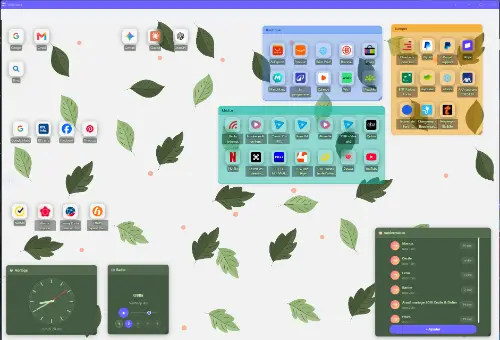
Resurf is a native macOS app for quickly capturing links, thoughts, PDFs, images and videos, then coming back to them later. You can save without switching windows, sort items from an inbox into spaces, tags and notes, and find anything through a powerful search or a Spotlight-style quick panel. Everything stays local in your file system, which suits Mac users who want a calm, private place for things they mean to revisit.

Pros
  • Capture links and files without leaving the app you are in
  • Search by keyword, type, tag, color, date or space
  • Local storage with no cloud account
  • Uneed reviewers single out its level of craft and polish
Cons
  • Mac only
  • Still in beta, with resurfacing features in active development
  • Local storage means no built-in sync to a phone

#1 Product of the Day#2 Product of the Day
96
2 reviews
Best for a private Mac libraryPaid
Logo of PostPocket:Save and Read Later
🥈

2. PostPocket:Save and Read Later

PostPocket is an iOS app built for saving content from any app without interrupting your scrolling. It suits people who find most of their reading inside social and news apps on their phone and want a single place to collect it. Uneed reviewers call it a must-have for anyone who saves a lot.

“Thanks for getting me in touch with this app. A must for everyone!”, @sandeep-singh-jain on Uneed

Pros
  • Save from any app without breaking your flow
  • Built specifically for the save and read later habit
  • Uneed reviewers recommend it broadly
Cons
  • Focused on iOS
  • Not aimed at heavy highlighting or annotation
#2 Product of the Day
45
(5)
Best for saving from any iPhone appFreemium
🥉

3. Instapaper

Instapaper is one of the original read later services. You save web articles and read them in a clean, text-focused view, with highlights and folders to keep things organized. It is a solid default for people who mostly save long-form articles.

Pros
  • Clean, distraction-free reading view
  • Long track record in the category
  • Works on iPhone, Android and the web
Cons
  • Focused on articles more than files or media
  • Fewer research tools than power-user readers
Not on Uneed yetBest for a classic article reader

4. Readwise Reader

Readwise Reader is a reading app for serious readers that brings articles, PDFs, newsletters and RSS feeds into one place. It is built around highlighting and annotation, and it syncs across a web app and mobile apps. It suits researchers, students and anyone who wants to keep what they read.

Pros
  • Handles articles, PDFs, newsletters and RSS in one inbox
  • Strong highlighting and annotation tools
  • Syncs across web and mobile
Cons
  • More features than casual savers need
  • Paid service
Not on Uneed yetBest for power readers and highlighters
Logo of Luckynote

5. Luckynote

Luckynote works like messaging yourself: you send notes, tasks, links and files, then search and organize them later. Uneed reviewers describe it as a single place where all their saved content ends up, and one notes that Instagram reels get downloaded and transcribed for them. It suits people who save a mix of links, videos and to-dos rather than only articles.

“I've been using Luckynote for a while now. It's an amazing tool that helps me organize my life and all my digital content. Imagine you're texting yourself everything, it's that simple, you just get some superpowers on top!”, @svetlana.miljanovic.91-808d on Uneed

Pros
  • Chat-style capture feels fast and familiar
  • Mixes links, files, notes and tasks in one place
  • Uneed reviewers praise its thoughtful details
  • Reviewers mention saved reels being transcribed
Cons
  • Not a dedicated distraction-free article reader
  • Chat format may feel loose for big reading lists
14
(7)
Best for texting yourself links and notesFreemium

7. Raindrop.io

Raindrop.io is a bookmark manager that saves links into collections with tags, with apps and browser extensions for most platforms. It leans more toward organizing bookmarks than long reading sessions. It fits people who save a lot of links across different devices and browsers.

Pros
  • Works across browsers and operating systems
  • Collections and tags for large link libraries
  • Good for saving more than just articles
Cons
  • Reading experience is secondary to bookmarking
Not on Uneed yetBest for cross-platform bookmarking
Logo of WebBoard

8. WebBoard

WebBoard turns your bookmarks into visual desktops you can share, with no ads and a free plan. It suits people who want saved links laid out visually by topic instead of sitting in a long list. Uneed reviewers appreciate how simple and lightweight it is.

Pros
  • Visual boards make saved links easy to scan
  • Boards can be shared
  • Free plan with no ads
  • Uneed reviewers like its lightweight feel
Cons
  • A reviewer would like an always-on-top desktop window
  • Built for organizing links, not reading articles in-app
#1 Product of the Day
101
1 review
Best for visual bookmark boardsFreemium
Logo of inklet

9. inklet

inklet is an ambient e-ink display for your second brain. Instead of hiding saved notes behind another app icon, it puts them on a display you see during the day. Uneed reviewers point to this as a smart answer to the problem that "later" rarely comes.

“The "later rarely comes" framing is the real insight here, and putting saved notes on an ambient display instead of behind another app icon is a smart fix. Does it pull directly from Obsidian and Notion?”, @zain-sheikh on Uneed

Pros
  • Keeps saved notes in view instead of buried in an app
  • Calm e-ink format
  • Uneed reviewers praise the core idea
Cons
  • A hardware product, not a reading app
  • Works alongside a note system rather than replacing a reader
#3 Product of the Week#1 Product of the Day
108
2 reviews
Best for actually revisiting saved notesPaid
Logo of Observely

10. Observely

Observely is a personal dashboard. A Uneed reviewer uses it to organize feeds by category, such as favorite Medium writers, and to share those feeds publicly. It suits readers who follow writers and sources and want them grouped in one place.

“I recommend this app as I am a user. I love how you can organize your feeds. This makes me categorize my fab medium writers and even share them publicly. I basically promote medium articles this way as Observely lets you share feeds as a public resource...smart idea.”, @nedim-hadzimahmutovic on Uneed

Pros
  • Organize feeds into categories
  • Feeds can be shared publicly
  • Uneed reviewers recommend it from daily use
Cons
  • Built around feeds, not saving individual links
#3 Product of the Week#1 Product of the Day
9
1 review
Best for organizing feeds you followPaid

Side-by-side comparison

ProductPlatformsWhat you saveStandout
ResurfmacOSLinks, ideas, PDFs, images, videosLocal library with deep search
PostPocket:Save and Read LateriOSContent from any appSave without leaving your scroll
InstapaperiOS, Android, webArticlesClean reading view
Readwise ReaderWeb and mobileArticles, PDFs, newsletters, RSSHighlighting and annotation
LuckynoteChat-style appLinks, notes, tasks, filesMessage yourself anything
GoodLinksiPhone, iPad, MacLinks and articlesNative Apple experience
Raindrop.ioMost platforms and browsersBookmarksCollections and tags
WebBoardWebBookmarksShareable visual boards
inkletE-ink displaySaved notesAmbient reminders
ObservelyWeb dashboardFeedsShareable feed categories

How to choose a read it later app

Start with where you find things to save. If most of it comes from your phone, pick something with fast mobile capture like PostPocket or Luckynote. If you work on a Mac all day, Resurf lets you capture without switching windows.

Next, decide what you save. Pure article readers like Instapaper and GoodLinks are best for long-form text. If you also save PDFs, images, videos or quick ideas, a library-style tool like Resurf or Readwise Reader fits better.

Finally, think about where your data lives. Local-first tools keep everything on your machine, which is good for privacy. Cloud tools make it easier to read the same list on several devices.

Read later app vs bookmark manager

A read later app is built for consuming: it saves a page, cleans it up, and gives you a comfortable place to read. A bookmark manager is built for organizing: it stores links in folders, collections or boards so you can find them again.

Raindrop.io and WebBoard lean toward bookmarking. Instapaper, GoodLinks and Readwise Reader lean toward reading. Resurf and Luckynote sit in between, acting as a personal library for anything you want to come back to.

How to actually read what you save

Most saved lists grow faster than anyone can read them. A few habits help: tag items when you save them, clear your inbox once a week, and delete anything you no longer care about.

Tools can help too. Search by type or tag makes old saves useful again, and approaches like inklet's ambient display keep saved notes in view so they do not disappear behind an app icon.

Frequently asked questions

What is the best read it later app?

It depends on how you save. For a private, polished library on a Mac, Resurf is our top pick. Readwise Reader suits heavy readers who highlight a lot, Instapaper is a strong classic article reader, and PostPocket is a good fit for saving from any app on iPhone.

What happened to Instapaper?

Instapaper is still running and remains one of the oldest read later services. The apps that shut down were Pocket and Omnivore, which pushed many users to look for alternatives like Instapaper, Readwise Reader, GoodLinks and newer tools.

How much does Readwise cost per month?

Readwise Reader is a paid service, and its pricing can change, so check its own site for current plans. If you want to avoid a subscription, look at tools with free plans or a one-time purchase instead.

What is the best reading app for free?

Several options in this list offer free plans, including WebBoard, Luckynote and PostPocket, and Instapaper and Raindrop.io also have free tiers. Free plans usually cover saving and reading, with extra features reserved for paid tiers.

What is a good Pocket alternative?

Instapaper and GoodLinks are the closest to Pocket's simple save and read model. If you want more than articles, Resurf on Mac or Luckynote let you save links alongside notes, files and media in one place.

How we picked these products

We picked these apps based on how well they handle saving content and returning to it later, using product descriptions, Uneed community votes and user reviews. We also included well-known read later apps that searchers commonly compare, and left out services that have shut down.

More guides