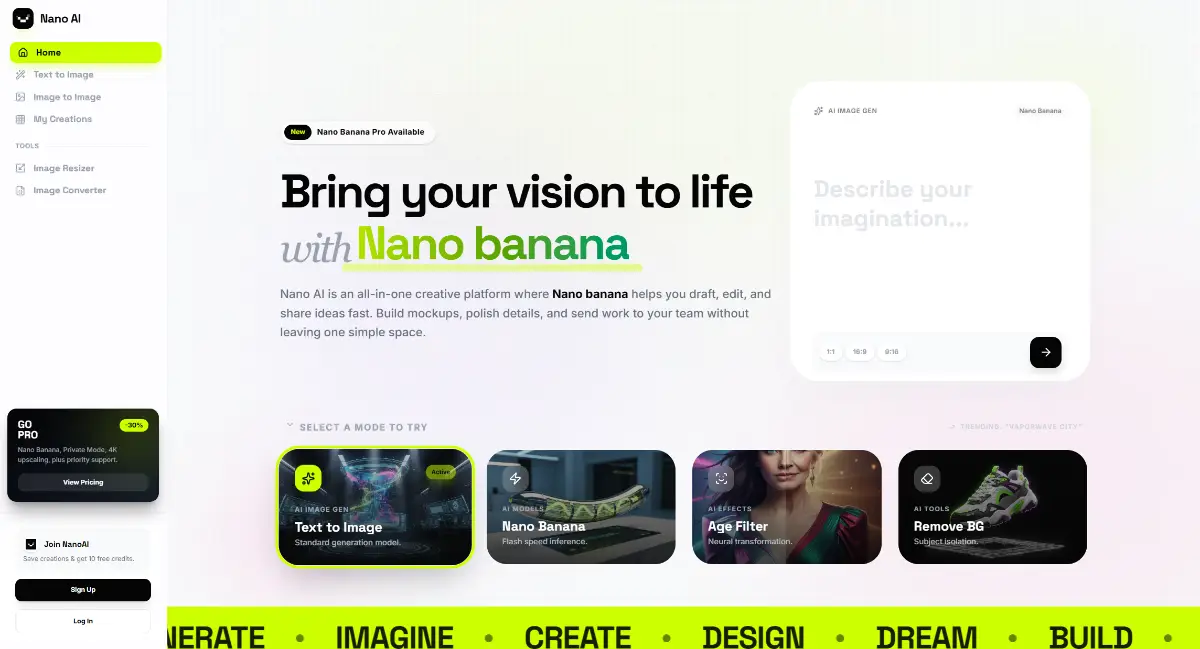
NanoAI’s AI studio unifies creation, editing, and post-processing flows inside a localized workspace.
Key Features
- Prompt-led Generation – Turn text into high-fidelity art through the Text to Image workspace, pairing localized prompts with NanoAI’s tuned style presets for fast ideation.
- Guided Image Transformations – Launch Image to Image to remix uploaded references, preserve overall structure, and explore alternative moods without re-creating assets from scratch.
- Precision Canvas Editor – Open the Image Editor to refine outputs directly in the browser, keeping every brush pass, crop, or adjustment aligned with the rest of the session.
- Creation Library – Visit My Creations to browse, favorite, and reuse everything you’ve produced, keeping iterations tied to the correct account context.
- Production Utilities – Use Image Resizer and Image Converter as built-in finishing tools to hit required dimensions or formats before publishing.
- Account-aware Workspace – The profile drawer shows credits, plan status, feedback links, and quick auth actions so teams stay on top of usage while moving between tools.
Perfect for:
- Content creators – Centralize prompting, editing, and publishing of visual assets in one dashboard.
- Designers & marketers – Produce platform-specific cutdowns or formatted deliverables on tight timelines.
- E-commerce operators – Maintain shared libraries and monitor credit usage while running multiple AI workflows.
Together, this workspace becomes the product’s launchpad—from concept to polished assets without breaking focus.