
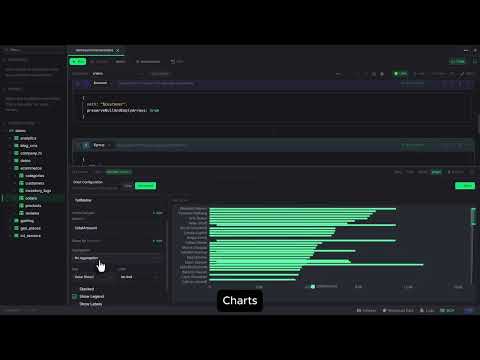


Monghoul is a desktop MongoDB GUI built for developers who want a modern, fast client with deep schema intelligence.
Built with Tauri v2 and Bun — the installer is ~33 MB and the app starts in under 2 seconds.
Schema-Aware Autocomplete
The standout feature is autocomplete that actually understands your data. It samples your collections and extracts field paths, types, and enum values — so when you type find({status: "}), it suggests real values like "pending", "active", "cancelled". In aggregation pipelines, it tracks document shape through every stage: after a $lookup it knows the foreign collection's fields, after $group it updates to your new shape, and $let variables become available immediately. Indexed fields get priority in $sort and $match.
MCP Server for AI Agents
A built-in MCP server exposes 70+ tools, letting AI assistants execute queries, build charts, organize your workspace, and even generate themes. Review mode stages AI-generated queries for manual approval before execution.
Aggregation Builder
A visual pipeline builder with drag-and-drop stages, live per-stage preview, and bidirectional sync with the code editor. Uses the same autocomplete engine, so you get schema-aware suggestions in the builder too. Supports run-to-here, auto-preview, undo/redo, and a dedicated $lookup helper form.
Query Analysis
The explain view grades query performance and suggests compound indexes following the ESR rule (Equality → Sort → Range) with one-click creation. Auto-explain badges in the result header show IXSCAN or COLLSCAN status for every query.
Result Viewer
Six result views: table, tree, JSON, explain, charts, and a visual view for write operations. The table view supports column pinning, reordering, inline editing with enum suggestions, nested data expansion, and side-by-side document diff. Charts support bar, line, pie, scatter, area, and stacked types with export to PNG.
Everything Else
Real-time cluster monitor with sparklines and slow query profiling, write protection for destructive operations, SSH tunneling, all
MongoDB auth methods (SCRAM, X.509, LDAP, Kerberos, AWS IAM), data import/export (JSON, CSV, Excel, NDJSON, cross-instance copy),
Faker-based test data generation, 10 built-in themes plus a full theme editor, multi-panel layouts with detachable windows, and a command palette for quick navigation.