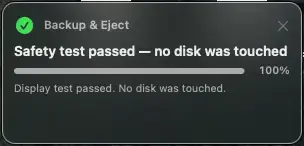
Backup & Eject is a native macOS menu-bar utility for deliberate, offline Time Machine backups.
Connect or power on a configured external Time Machine disk, start the backup from one menu command, and follow every stage in a compact progress panel. The app waits for Time Machine to finish before safely ejecting the disk and notifying you that it can be powered off.
It is especially useful for keeping a recovery disk offline between backups, including as a safeguard when working with AI tools that have broad file access. It never force-ejects, validates the selected destination before every operation, and has no analytics, accounts, advertising, or network service of its own.
About Backup and Eject
Backup and Eject is a development product listed on Uneed, available for free. It's tagged with MacOS, Automation. See the best MacOS products for related options.
Frequently asked questions about Backup and Eject
What is Backup and Eject?
Backup and Eject is manual Time Machine backups with progress and safe disk ejection.
Is Backup and Eject free?
Yes, Backup and Eject is free to use.
What are alternatives to Backup and Eject?
Discover similar macos, automation, desktop apps products in the Uneed directory.
What category does Backup and Eject belong to?
Backup and Eject is listed under Development on Uneed.
This product has no rewards yet.
This product has no deals yet.